
Shadow AI Discovery
Find shadow AI and bring it under policy
Discover unapproved AI agents, MCP servers and AI tools, give each one an owner and govern it with the same identity, policy and audit trail as the agents you sanctioned.
Your people are already using unapproved AI agents: a coding agent installed on a laptop, an MCP server added to it in a minute, a script calling a model on a personal key. Each one acts with someone's access, and many are missing from the lists security keeps.
Shadow AI is any AI agent, MCP server or AI tool used at work without the knowledge or approval of IT and security. Shadow AI agents carry more risk than chat assistants because they read files, call tools and change systems. A detection-only tool stops at the list. SecureAuth Agent Authority finds them, gives each one an owner and a status and puts it under the same policy as the agents you approved.
- Discover shadow agents and unapproved MCP servers on devices, agent identities in your directories and unknown agents in model traffic
- Own each agent with a named owner and a status: sanctioned, under review or shadow AI
- Govern it with rules by agent and tag, a decision on every call, revocation from one place and a record in Agent Trail
The risk
Shadow AI risks go further than data leaks
Shadow IT put data in unapproved apps. Shadow AI agents also act on that data, quickly and with real access, often without anyone watching.
Customer data leaves in prompts
People paste customer names, phone numbers and account details into prompts, and an unapproved model receives them.
Agents act with a person's access
A shadow agent can reach whatever the person who started it can, so one bad instruction can read, change or delete real data.
Unvetted MCP servers
MCP servers added on a laptop connect agents to databases and outside services, and a tool can change after anyone trusted it.
Data goes to new destinations
Agents send data to model providers and outside services that went unreviewed, so it's hard to say where it went.
No owner when something breaks
Agents set up once keep running after the project ends or the person moves on, and then they have no clear owner.
Agent identities with standing secrets
App registrations and agent identities keep multiplying in your directory, and they often sign in with long-lived secrets and no MFA.
Banning AI leaves these risks in place, because people who find it useful keep using it out of sight. A better route is to see every agent, give it an owner and control what it may do.
Discover
How to detect shadow AI across devices, directories and model traffic
Shadow AI doesn't show up in one place, so no single scan finds all of it. AI agent discovery in Agent Authority looks in three: the devices people work on, the directories and tools you already run, and the traffic between agents and AI models.
On the device
AI agents people installed themselves, the local MCP servers connected to them and where each one sends data.
Endpoint Authority
local-postgresLocal · used by CursorUnapproved MCPIn your directories and tools
Agent identities and non-human identities known to Microsoft Entra, Okta, CrowdStrike, Zscaler, F5 and more.
NHI Inventory
Copilot Studio agentMicrosoft Entra · Owners: noneFindingIn model traffic
Agents calling AI models that aren't on your approved list, with the person behind each one.
LLM Authority
Unknown agentFinance · gemini-proNew, review
One register
Everything found lands in NHI Inventory, the register of every agent and the service accounts, API keys and tokens it relies on, with each agent counted once.
Find shadow agents and unapproved MCP servers on each laptop
Endpoint Authority puts a sensor on employee laptops. It shows which AI agents are installed and running, including the ones people set up on their own, and the MCP servers connected to them.
- Claude Code, Claude Desktop, Cursor, GitHub Copilot, Codex, Gemini CLI and desktop AI apps
- Agents IT installed and agents people installed themselves, side by side
- Local MCP servers flagged when they aren't on your approved list
- Connections to MCP servers outside your company, with the agent that opened them
- Where each agent sends data, so a new destination stands out
- Rolled out with Jamf or Intune, with no new browser and no proxy change
AI agents
MCP servers
Count unmanaged AI use across laptops, desktops and CI runners
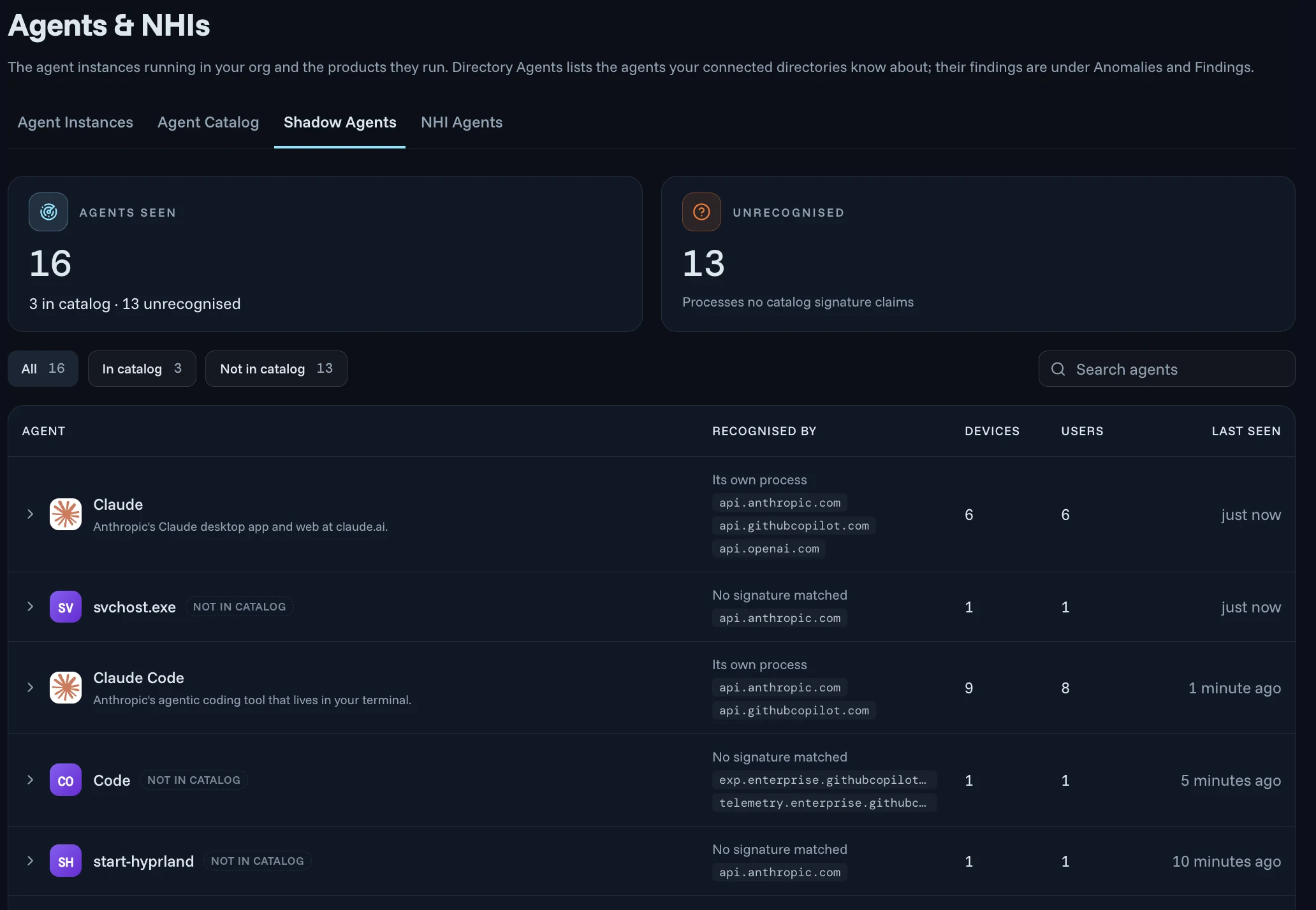
In early access, NHI Inventory sensors on laptops, desktops and CI runners report the AI agents people run and flag the processes that aren't in your catalog.
- Known agents recognized by their own process, such as Claude and Claude Code
- Unrecognized processes marked Not in catalog, with the AI domains they called
- The number of devices and users for each, so you get a real count of unmanaged AI use
- Each sensor listed with its owner, when it was last seen and whether it is active or revoked
Surface agent identities in your directories and SaaS
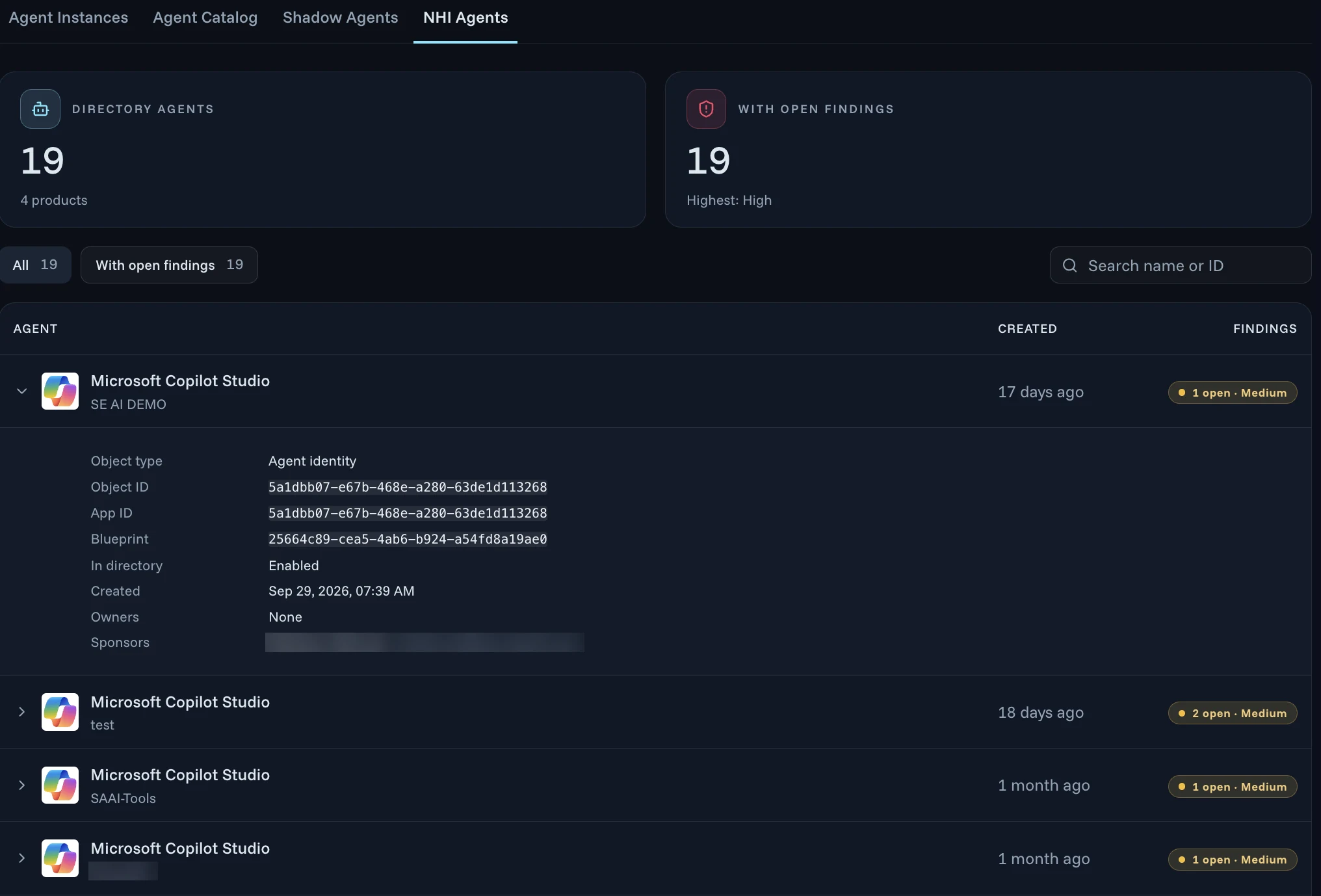
Shadow AI isn't only on laptops. Connect the identity, endpoint and network providers you already run, and the agents and non-human identities they know about land in the same register.
- Discovery sources such as Microsoft Entra, Okta, CrowdStrike, Zscaler and F5, each showing whether it's authenticated and when it was last checked
- Directory agents such as Microsoft Copilot Studio agents in Microsoft Entra, with their IDs and when each was created
- Owners and sponsors listed, so an agent with no owner stands out
- In early access, scheduled reviews of app registrations and agent identities, with findings by severity and what to do next
Spot an unknown agent calling an AI model
When your AI tools reach models through LLM Authority, each prompt and response is logged with the agent, the person behind it and the model. An agent that isn't on your approved list is flagged for review.
- Models from OpenAI, Anthropic, Google Gemini, Azure OpenAI and Amazon Bedrock
- Unusual activity alerts when someone starts using a new model or spend jumps overnight
- One line per tool to point it at LLM Authority, with no SDK and no agent rewrite
- Cut off one agent without stopping the person who started it
For a step-by-step guide, read how to find the AI agents running in your systems.
Own
Give every shadow AI agent an owner and a status
After an agent is found, it needs someone who answers for it and a status that says whether it may run.
The registry records each agent as a named, versioned non-human principal with an accountable owner, a stated purpose and a list of allowed tools. Discovered agents are mapped to an owning team, classified by risk, then brought under governance or decommissioned.
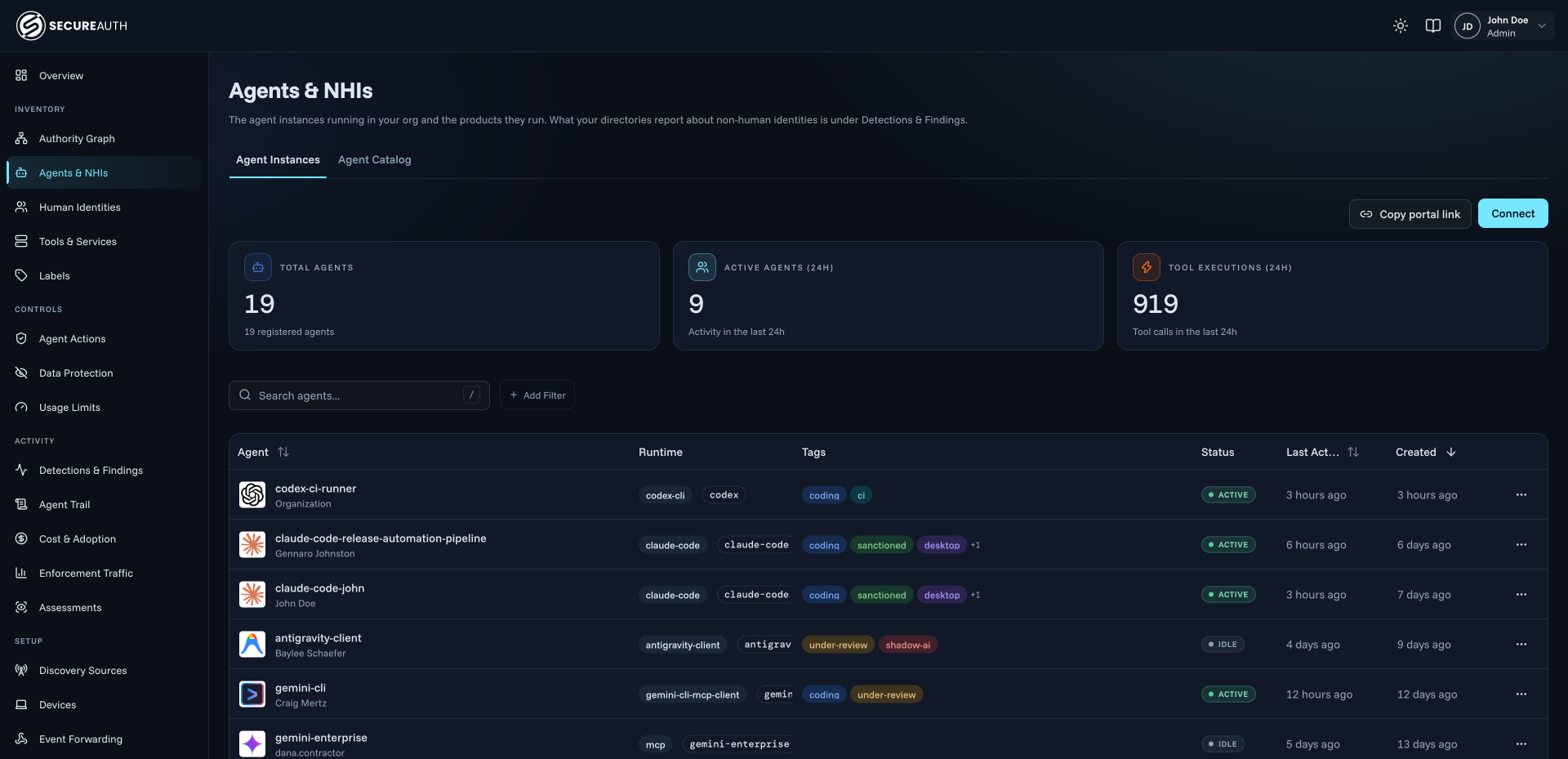
- sanctioned
- Approved for use. Rules give sanctioned agents the tools their work needs.
- under-review
- Found and owned, waiting for a decision. Keep it to low-risk tools until the owner and security sign off.
- shadow-ai
- Never registered. Refuse it sensitive tools, or everything, until someone reviews it.
- Agents whose owner account is disabled are flagged, so the team can assign a new owner or revoke them
- Offboard someone in your identity provider, such as Okta, and the agents on their laptops lose access with them
Why the register comes first: why you need an AI agent inventory.
Govern
Govern shadow AI with policy instead of a ban
Once an agent has an owner and a status, it falls under the same rules as every approved agent. Policy decides what it may do on every call, and anything that shouldn't run can be revoked.
- DiscoverShadow AI
Cursor found on MBP-0412
- Installed by the user, not by IT
- Connected to local-postgres, a local MCP server that isn't on the approved list
- OwnUnder review
Mapped to an owner and a status
- Tied to the platform engineer signed in through Okta
- Mapped to the eng-platform team and tagged under-review
- GovernUnder policy
Held to the same rules
- The rule Only approved MCP servers blocks the local-postgres connection before it runs
- The block is logged to Agent Trail with the person, the agent and the rule
Five decisions, not just block or allow
On every tool call and model request, Agent Authority weighs the person, the agent and its status, the tool, the arguments and live risk, then makes one of five decisions. A shadow agent can be slowed, filtered or sent to a person for approval instead of being cut off outright.
The decision on each call
- AllowWithin policy, proceeds
- RedactProceeds, PII and PHI removed
- ThrottleSlowed to its limits
- Ask a personHeld for approval with CIBA
- DenyBlocked and recorded
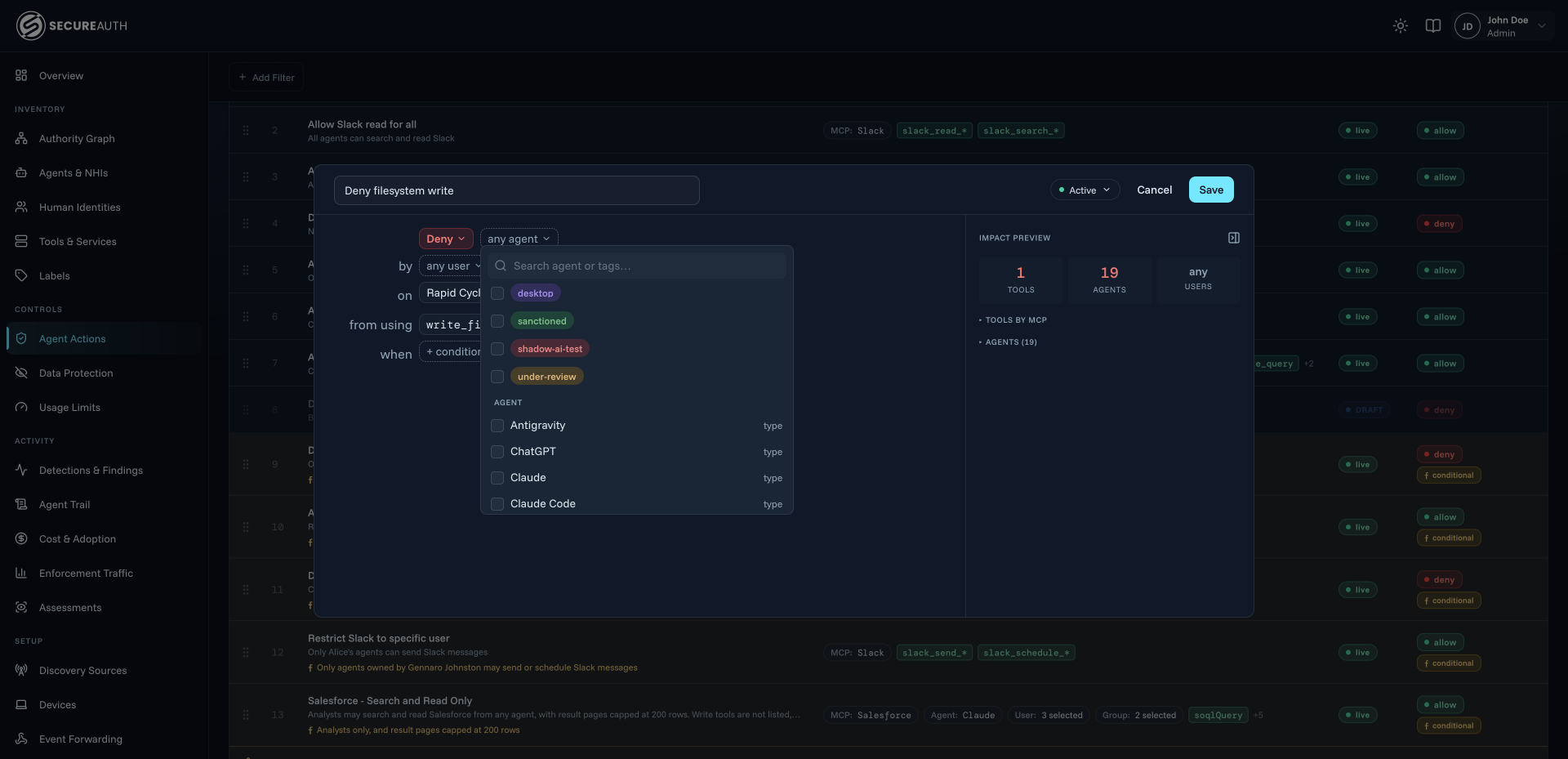
Write rules by tag, not one agent at a time
Rules read as sentences: which agents, used by whom, may call which tools, under what condition. One rule can name a tag, a whole agent type or a single agent, so a rule such as “agents tagged Sanctioned can use the GitHub tools; any other agent is refused the delete-branch tool” covers every shadow agent you haven't reviewed yet.
On the laptop, Endpoint Authority applies the same rules before an action runs, so a local agent can't connect to an unapproved MCP server even when nothing passes a gateway.
Give people an approved path
Shadow AI grows when the approved route is slow. With MCP Authority, people browse a catalog of 50+ MCP servers plus your own, request the tool they need and get it approved, with no ticket.
- The Requests queue shows the tools many people ask for, so they get reviewed first
- A tool that changes after approval is blocked until an admin re-approves it
- People keep the AI tools they like; each is pointed at one endpoint
Revoke what shouldn't run
When a shadow agent shouldn't be there, take it out from one place, without touching the person's other agents.
- Revoke, downscope or stop a single agent instance in one step
- Revocation takes effect on the agent's next call, before its token expires
- Every decision is written to Agent Trail with the rule that made it, searchable by agent, person or tool
Detect and govern shadow AI in five steps
A shadow AI program that starts with what you already run and ends with every agent under policy.
Connect your discovery sources
Add Microsoft Entra, Okta, CrowdStrike, Zscaler, F5 or the other identity, endpoint and network providers you run, so the agents and non-human identities they know about land in NHI Inventory.
Put the sensor on laptops
Roll out Endpoint Authority with Jamf or Intune to see the AI agents and MCP servers on each device, including the ones people installed themselves.
Route AI tools through one checkpoint
Point each AI tool at MCP Authority and LLM Authority, one line per tool, so every tool call and model request is checked and logged with the agent and the person.
Assign owners and statuses
Review what was found, map each agent to an owning team and tag it sanctioned, under review or shadow AI.
Write rules and revoke the rest
Write rules by tag, offer an approved catalog of tools people can request, and revoke or decommission the agents that shouldn't run.
Beyond detection
Shadow AI discovery with enforcement built in
An inventory tells you what exists. To change what a shadow agent can do, discovery has to feed the same policy that decides every call.
| Capability | Agent Authority | An inventory alone |
|---|---|---|
| Agents and non-human identities in one registerFound on devices, in directories and in model traffic. | Agent AuthorityYes | An inventory aloneYes |
| A named owner and a status for every agentSanctioned, under review or shadow AI. | Agent AuthorityYes | An inventory aloneYes |
| Unapproved local MCP servers flagged on the device | Agent AuthorityYes | An inventory alonePartial |
| An unapproved MCP connection blocked before it runsEndpoint Authority applies your rules on the laptop, even when nothing passes a gateway. | Agent AuthorityYes | An inventory aloneNo |
| Rules by agent and tag on every tool call and model requestOne rule can name a tag, a whole agent type or a single agent. | Agent AuthorityYes | An inventory aloneNo |
| Five decisions: allow, redact, throttle, ask a person, deny | Agent AuthorityYes | An inventory aloneNo |
| Revocation takes effect on the agent's next call | Agent AuthorityYes | An inventory aloneAlert to the owner |
| Offboarding someone cuts off the agents on their laptops | Agent AuthorityYes | An inventory aloneNo |
| An approved path: a tool catalog with self-service requests | Agent AuthorityYes | An inventory aloneNo |
| Every decision recorded with the rule that made it | Agent AuthorityAgent Trail | An inventory aloneFindings only |
Shadow AI FAQ
What is shadow AI?
Shadow AI is any AI agent, MCP server or AI tool used at work without the knowledge or approval of IT and security. It includes chat assistants used with company data, coding agents installed on laptops, MCP servers people add to those agents and scripts that call AI models on personal API keys. Because security can't see them, it's hard to say what data they reach or what they did.
What are shadow AI agents, and how are they different from shadow IT?
Shadow IT is an app or service used without approval, and the risk is mostly where data ends up. Shadow AI agents act: they read files, call tools through MCP servers, run commands and send data to model providers, with the access of the person who started them. That makes each one a non-human identity with real permissions, which needs an owner and a policy, not just a line in an asset list.
Why is shadow AI important to address?
Because an unapproved agent can do whatever its user can. Customer data pasted into prompts leaves the company, unvetted MCP servers connect agents to databases and outside services, agents keep running after their owner moves on, and agent identities in your directory often sign in with long-lived secrets and no MFA. Discovery and policy address it more reliably than a ban.
How do you detect shadow AI?
Look in three places. On devices, a sensor finds the AI agents and local MCP servers people run, including the ones they installed themselves, and where each sends data. In your directories and security tools, discovery sources such as Microsoft Entra, Okta, CrowdStrike, Zscaler and F5 list agent identities and other non-human identities. In model traffic, a checkpoint between AI tools and model providers flags agents that aren't on your approved list. SecureAuth Agent Authority covers all three and records what it finds in NHI Inventory.
How do you find unapproved MCP servers?
Endpoint Authority flags local MCP servers on a laptop when they aren't on your approved list, and shows connections to MCP servers outside your company with the agent that opened them. It can then block a local agent from connecting to an unapproved MCP server before the connection runs, and records the block in Agent Trail with the person, the agent and the rule.
Can you see which AI agents are calling models without approval?
Yes, for AI tools routed through LLM Authority. Each prompt and response is logged with the agent, the person behind it and the model it reached, and an agent that isn't on your approved list is flagged for review. Unusual activity alerts also tell you when someone starts using a new model. Pointing a tool at LLM Authority takes one line per tool.
What happens after a shadow AI agent is found?
It is mapped to an owning team, classified by risk and tagged with a status such as sanctioned, under review or shadow AI. From there it is brought under governance or decommissioned. Policy can treat each status differently, for example giving sanctioned agents the tools they need and refusing sensitive tools to every other agent.
Should we block shadow AI or ban AI tools?
A blanket ban tends to push AI use further out of sight. A better shadow AI policy is to see every agent, approve the useful ones, give people a quick way to request the tools they need, and decide what each agent may do on every call. Agent Authority's five decisions (Allow, Redact, Throttle, Ask a person or Deny) let you say yes with limits instead of only yes or no.
How do you revoke or quarantine a shadow agent?
From the Agent Authority console. You can revoke, downscope or stop a single agent instance in one step without touching the person's other agents, and revocation takes effect on the agent's next call rather than when its token expires. When someone is offboarded in your identity provider, such as Okta, the agents on their laptops lose access with them.
How is shadow AI discovery different from an AI agent inventory?
An AI agent inventory is the register of the agents you know about. Shadow AI discovery is how unregistered agents get into it. In Agent Authority they are one system: discovery on devices, in directories and in model traffic feeds NHI Inventory, and the register feeds the policy that decides every call, so finding an agent and controlling it happen in the same place.
Find your shadow AI and bring it under policy
14-day free trial. Your own Agent Authority tenant.
Run it in the SecureAuth-hosted cloud, a dedicated or private cloud, self-hosted or air-gapped.
Updated