
NHI Inventory
Every agent and identity, each with an owner
NHI Inventory is one register of every AI agent and the service accounts, keys and tokens it relies on: four pillars built as one system, each entry with a named owner.
At a glance
What's in NHI Inventory
- Why it mattersEvery other control depends on knowing which agent is actingThe register Agent Authority works from
- Agent inventoryOne register of every agent, each with a named ownerAgent register
- Discovery on devicesThe agents nobody registered, on the machines people useShadow agents
- Discovery in your directoryRisky app and agent identities, reviewed on a scheduleDirectory review · What each entry shows
- Discovery sourcesThe identity, endpoint and network tools you already runDiscovery sources · Providers
Part of Agent Authority
The register the rest of Agent Authority works from
A rule that only knows the user can't tell one agent from another using the same credentials. Knowing which agent is acting, and who owns it, comes first.
- MCP, LLM and Endpoint Authority decide on the agent, not only the person it acts for
- Agent Threats & Findings ties each finding to an agent and its owner
See how it fits together on the Agent Authority overview.
- Owner
- Platform team
- Purpose
- Code review on pull requests
- Allowed tools
- GitHub, Atlassian
- MCP AuthorityWhich agent is calling a tool
- LLM AuthorityWhich agent is calling a model
- Endpoint AuthorityWhich agent runs on a device
- Agent Threats & FindingsWhose agent a finding is on
Pillar 1 · Agent inventory
One register of every agent, each with a named owner
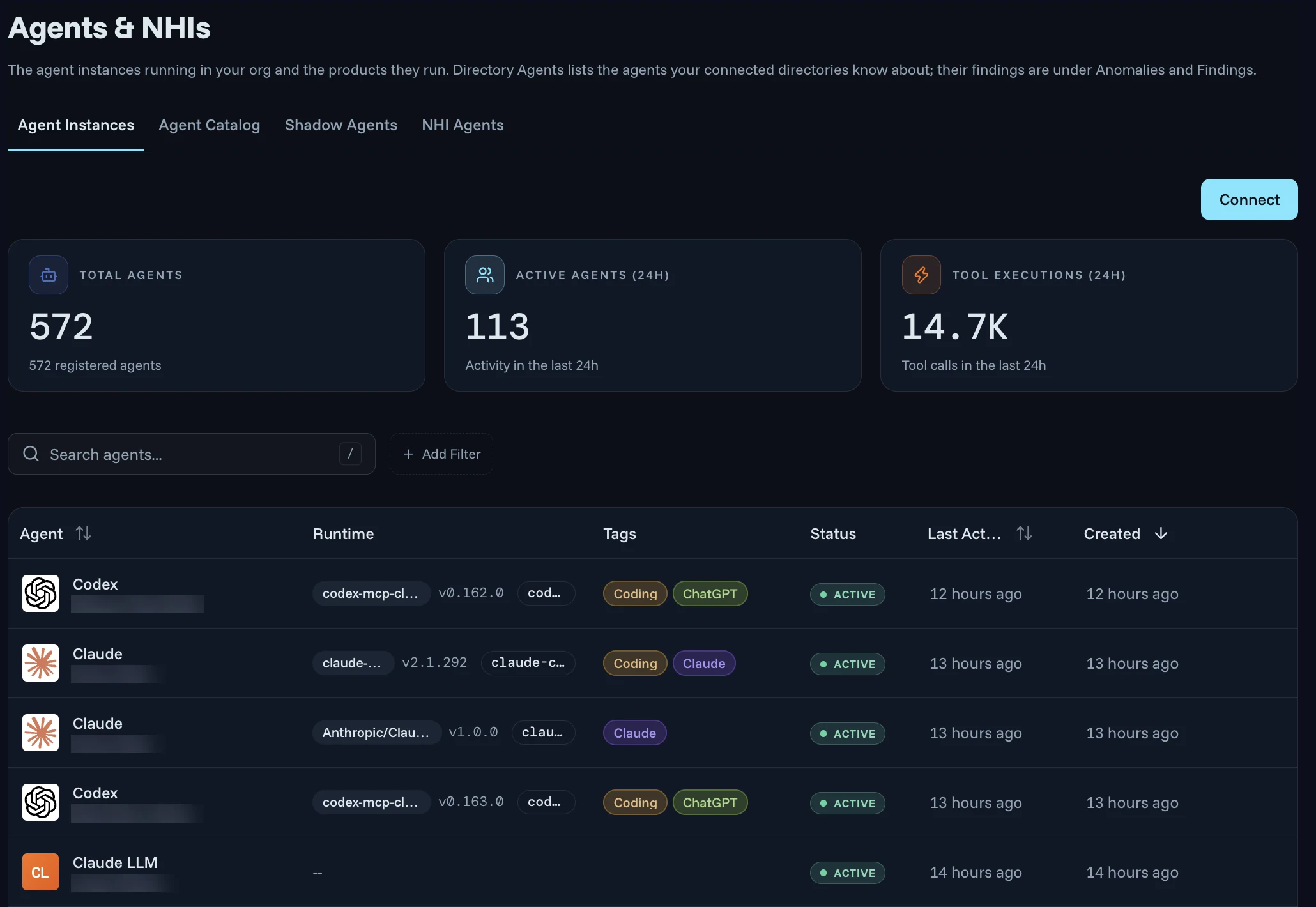
Every other control depends on knowing which agent is acting. NHI Inventory keeps one register of every agent in use, along with the service accounts, API keys and tokens those agents rely on, surfaced and mapped.
- Each agent is a named, versioned, registered non-human principal
- An accountable owner, a stated purpose and a list of allowed tools
- Map each one to an owning team
Pillar 2 · Discovery on devices
Find the agents nobody registered, on the machines people use
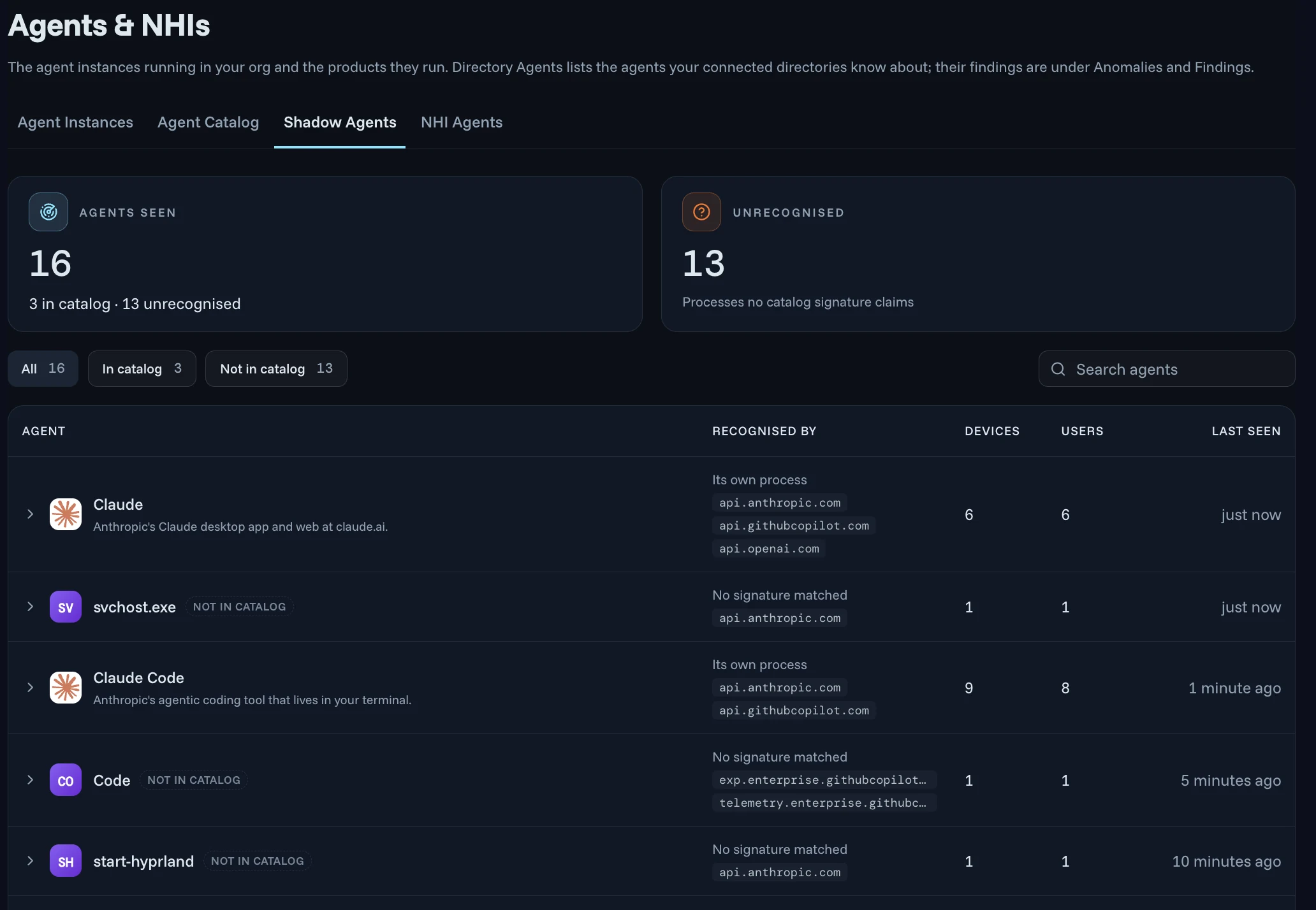
Sensors installed on each laptop, desktop or CI runner are listed with their owner, when they were last seen and whether they are active or revoked. Agents found there that were never registered show up in the register too.
- Early access: sensors report the AI agents people run, such as Claude and Claude Code, and flag processes that are not in the catalog
- The number of devices and users for each, so you get a real count of unmanaged AI use
Local MCP servers, where each agent sends data and on-device rules are covered in Endpoint Authority.
Pillar 3 · Discovery in your directory
Surface the risky app and agent identities in your directory
App registrations and agent identities keep multiplying, and they often sign in with long-lived secrets and no MFA. Agent Authority reviews them in your configured directory, such as Microsoft Entra, on a schedule.
- Early access: scheduled reviews of the app registrations and agent identities in your configured directory
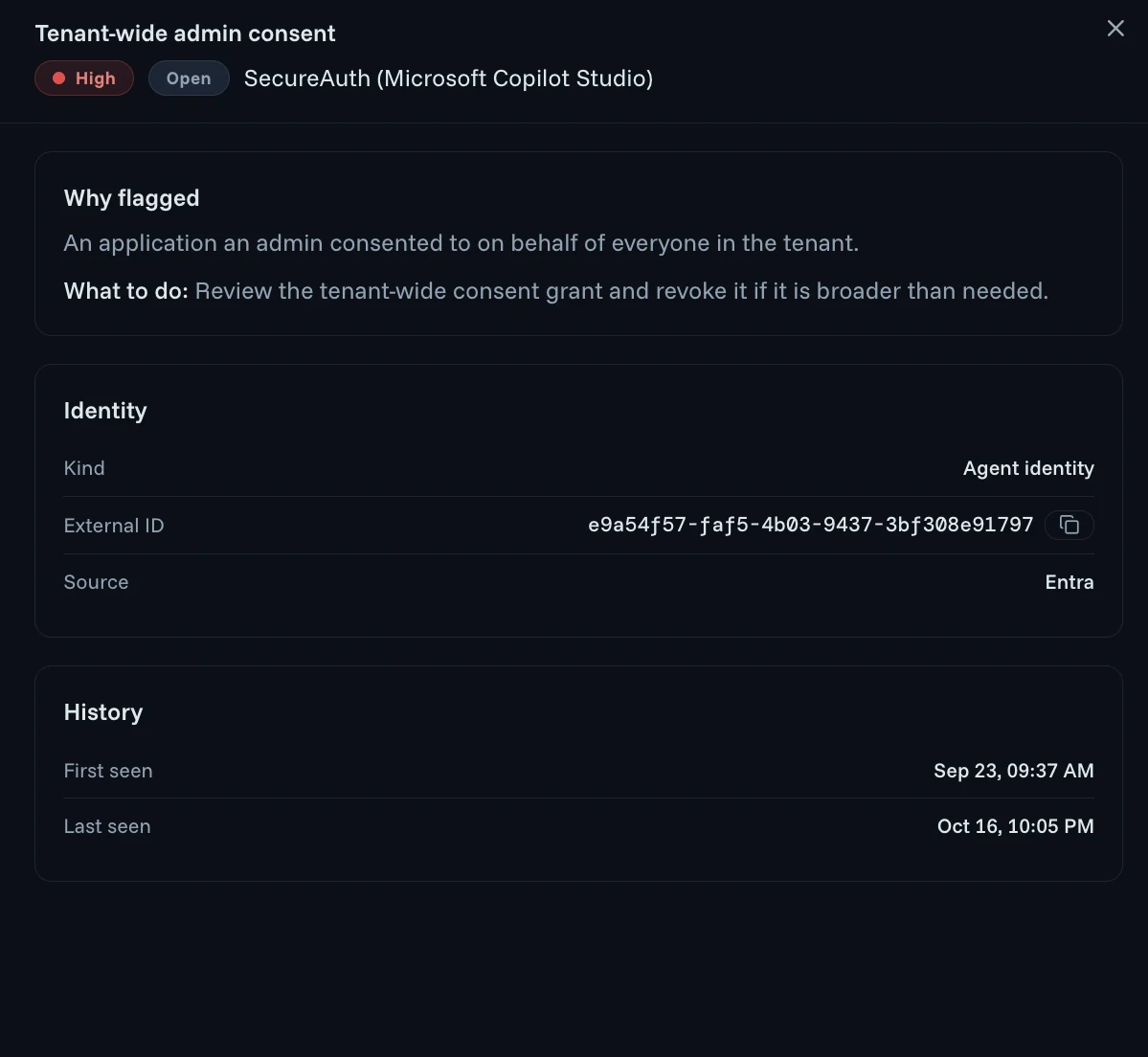
- Findings are listed by severity, with the rule, the identity and its kind, service principal or application
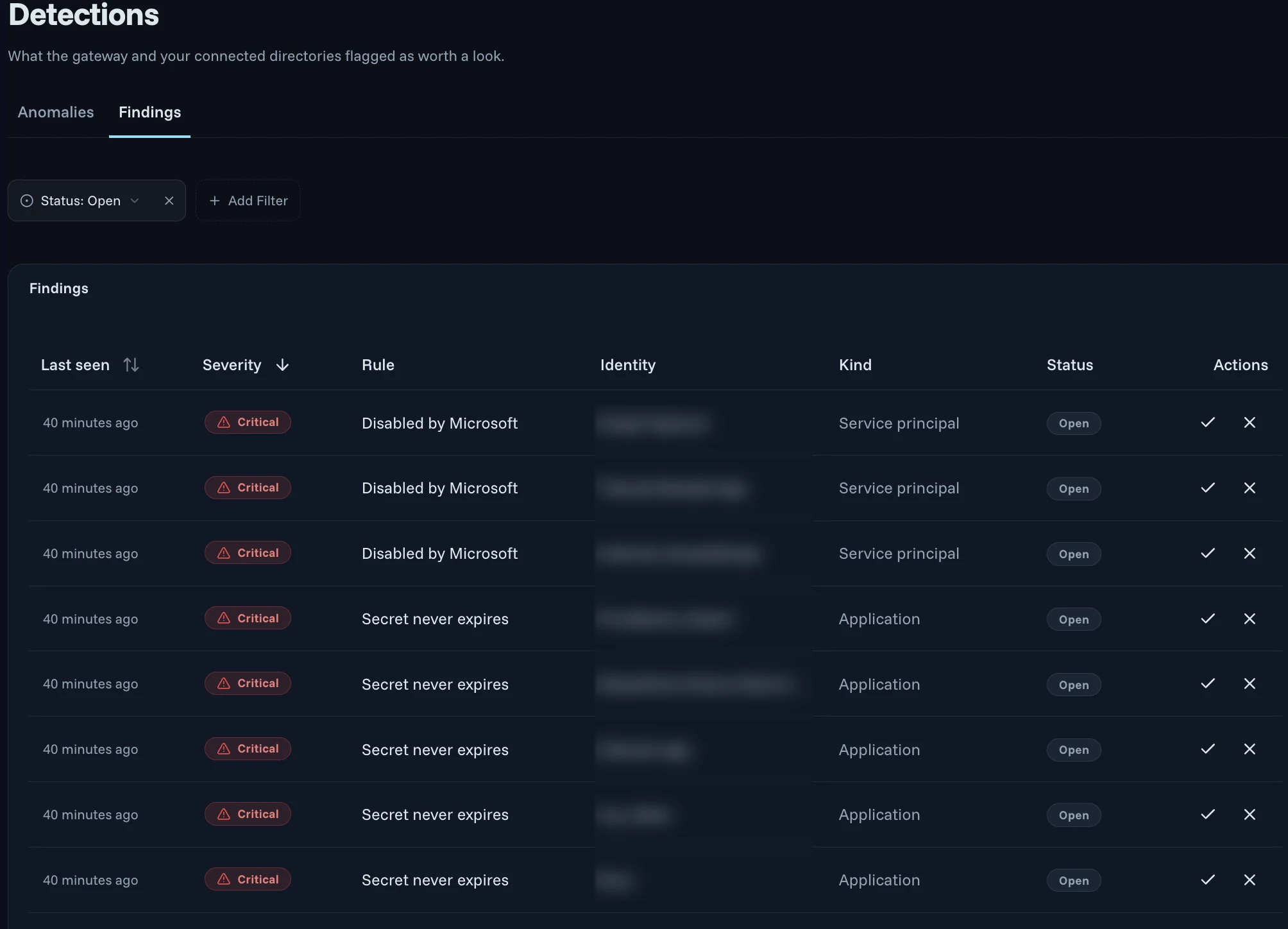
- Each finding explains why it was flagged and what to do next, and can be acknowledged or dismissed
The findings themselves live in Agent Threats & Findings.
Pillar 3 · Discovery in your directory
Every directory agent, with its IDs, owners and open findings
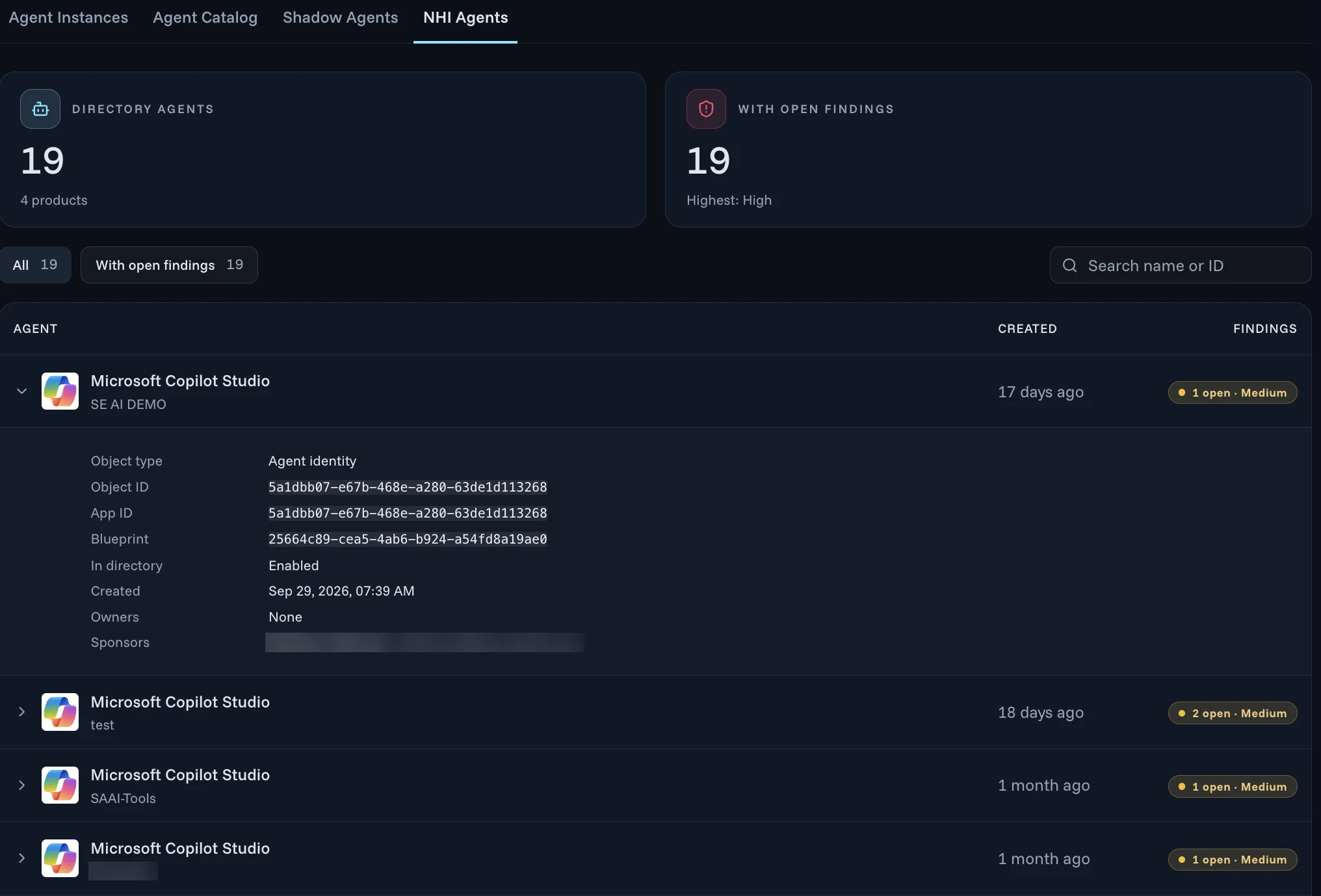
The agents your connected directory knows about, such as Microsoft Copilot Studio agents in Microsoft Entra, are listed with when they were created and how many findings are open. Open one to see the rest.
- Object type, object ID, app ID and blueprint
- Whether it's enabled in the directory, and when it was created
- Its owners and sponsors, so an agent with no owner stands out
- Open findings with their severity
Pillar 4 · Discovery sources
Discover NHIs from the tools you already run
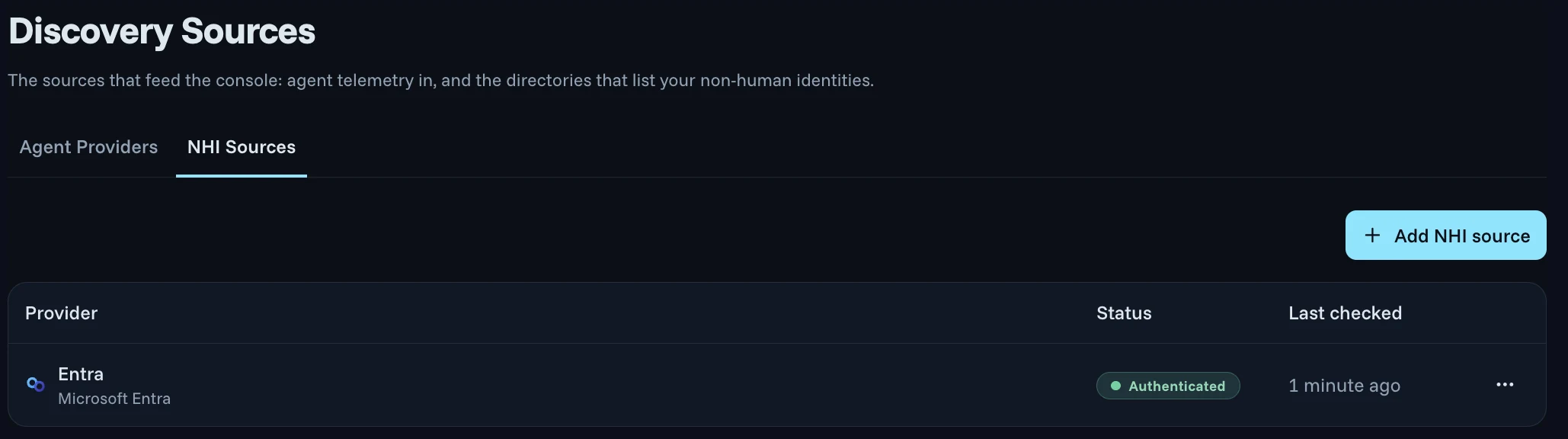
Connect the identity, endpoint and network providers you already use. The agents and non-human identities they know about land in one register.
- Agent providers bring agent telemetry in
- NHI sources list the non-human identities in your directories
- Each source shows whether it's authenticated and when it was last checked
Discovers from
- Microsoft Entra
- Okta
- CrowdStrike
- Zscaler
- F5
- And more
Identity, endpoint and network providers you already run, each added as a source under Discovery Sources.
Related capabilities
Put the register to work
- Agent Threats & FindingsRisky identities, anomalies and the fix for each, ranked by severityLearn more
- Compliance & Risk AssessmentsExposure reviews, agent risk rankings and audit-ready evidenceLearn more
- MCP AuthorityGovern which agents reach which MCP tools, call by callLearn more
- LLM AuthorityControl which agents call which AI models, with spend and data limitsLearn more
- Endpoint AuthorityFind and check AI agents and MCP servers on every deviceLearn more
NHI Inventory FAQ
What is NHI Inventory?
NHI Inventory is one register of every AI agent and the service accounts, API keys and tokens those agents rely on, each with a named owner. Agents are found on devices and in your connected directories, and anything not in your catalog is flagged.
Which non-human identities does NHI Inventory keep track of?
Every agent in use, as a named, versioned, registered non-human principal, along with the service accounts, API keys and tokens those agents rely on. From your directory it also lists app registrations and agent identities, such as Microsoft Copilot Studio agents in Microsoft Entra.
How does NHI Inventory find agents nobody registered?
In early access, sensors installed on laptops, desktops and CI runners report the AI agents people run, such as Claude and Claude Code, and flag processes that are not in the catalog. Each comes with the number of devices and users, so you get a real count of unmanaged AI use.
What does NHI Inventory check in my directory?
In early access, Agent Authority reviews the app registrations and agent identities in your configured directory, such as Microsoft Entra, on a schedule. Each finding explains why it was flagged and what to do next, and you can sort by severity to fix the biggest exposures first.
Which tools can NHI Inventory discover from?
Connect the identity, endpoint and network providers you already use, such as Microsoft Entra, Okta, CrowdStrike, Zscaler and F5, and more. Each source shows whether it's authenticated and when it was last checked, and the agents and non-human identities it knows about land in one register.
How does NHI Inventory fit into Agent Authority?
It is the register the rest of Agent Authority works from. A rule that only knows the user can't tell one agent from another using the same credentials, so knowing which agent is acting, and who owns it, comes first. The findings themselves live in Agent Threats & Findings.
Know every agent and who owns it
14-day free trial. Your own Agent Authority tenant.Add your first source under Discovery Sources, and its agents and non-human identities start filling the register. Read how the agent registry works and how non-human identities are surfaced.
Start free trial