
AI Adoption & Cost Controls
AI cost control that keeps AI adoption growing
See who uses AI and what it costs, attribute every dollar to a team, person, agent and model, enforce budgets on the next call and cut the tokens each call uses.
AI spend grows from the bottom up: people adopt tools on their own, agents call models without anyone watching, and the provider bill arrives as one number with no names on it.
AI cost control, also called AI spend management, is how you see, attribute and cap what every team, person and agent spends on AI models and tools, so adoption can grow while every cost has an owner. Agent Authority does it at one checkpoint that every AI request passes through once each tool points at it: each call carries the agent, the person behind it and the model, so spend is attributed as it happens and budgets take effect on the next call.
- FinOps gets spend by team, person, agent and model, ready for showback and chargeback
- Platform and IT teams set approved models, budgets and rate limits, enforced on every call
- CIOs see adoption against cost per active user, and fund the teams getting value
The gap
Per-key spend caps leave AI cost without an owner
A cap on an API key reports spend after it has happened. AI cost control needs every call attributed to whoever ran it, and a budget that acts before the invoice.
Adoption you can't measure
People sign up for AI tools on their own and agents call models without anyone watching. License counts don't show who actually uses them.
A bill with no owner
A provider invoice shows one total per API key or project. It doesn't say which team, person or agent spent it, so the number has no owner and next quarter is hard to plan.
Late warning of runaway cost
An agent stuck in a loop, or a leaked API key, can burn through a month's budget in a day. Without a live baseline, you hear about it when finance does.
| Capability | Agent Authority | Per-key spend caps |
|---|---|---|
| Spend attributed to the team, person, agent and modelEvery call carries the agent, the person behind it and the model, priced at what you actually pay. | Agent AuthorityYes | Per-key spend capsPer API key or project |
| Budgets per team and per person, from your IdP groupsEach person has a budget inside the team's, using the groups you already have. | Agent AuthorityYes | Per-key spend capsPartial |
| Budgets and rate limits per agent instance, not just per keyA runaway agent is throttled or cut off on its own, without stopping the person who started it. | Agent AuthorityYes | Per-key spend capsNo |
| Approved models per teamSales may use Claude Sonnet only; contractors get no frontier models. | Agent AuthorityYes | Per-key spend capsPartial |
| Requests stop when a budget runs outEnforced on the next call, weeks before the invoice. | Agent AuthorityYes | Per-key spend capsPartial |
| Adoption shown against cost per active userActive and idle seats by team, so you can reclaim seats and fund the teams getting value. | Agent AuthorityYes | Per-key spend capsNo |
| Cost spikes measured against a baseline and ranked against peersSpend over the past 90 days, with what's typical beside what was observed. | Agent AuthorityYes | Per-key spend capsNo |
| Fewer tokens per call through tool-call optimizationThe MCP gateway sends the model a smaller context window. | Agent AuthorityYes | Per-key spend capsNo |
| Routine work routed to smaller, cheaper modelsFrontier models are kept for the work that needs them. | Agent AuthorityYes | Per-key spend capsNo |
| Every call logged with the agent, person and modelOne record for FinOps, IT and security, which you can send to your SIEM. | Agent AuthorityYes | Per-key spend capsNo |
Pillar 1 · Measure adoption
AI adoption metrics by team, from idle seats to cost per active user
Measure the people actually using AI alongside the licenses you bought. Agent Authority shows usage growth by team, the agents and models each team uses and what that use costs.
- Adoption curve: usage growth by team, over time
- Active against idle seats, and who uses their seat, from quietest to heaviest
- Adoption against cost per active user, with teams under 50% adoption called out
- The model mix by team, and which agents each team runs
- Engineering
- Customer Success
- Finance
AI use outside your approved tools won't appear in these figures. To find unapproved AI tools and agents, see shadow AI discovery.
Pillar 2 · Attribute spend
AI cost attribution for showback and chargeback
Every request carries the agent, the person behind it and the model, so spend is attributed as it happens, priced at what you actually pay, and finance gets figures it can bill against.
| Spend by | What you see | What it's for |
|---|---|---|
| TeamFrom the groups in your IdP | What you seeSpend against the team's budget, seats, active users, adoption and real spend per active user. | What it's forShowback reports per team, chargeback to the team that ran the work and next quarter's budget. |
| PersonA verified person from your IdP | What you seeTheir own budget inside the team's, and who is using their seat, from quietest to heaviest. | What it's forReclaim idle seats and see who drives the spend inside each team. |
| AgentEach agent instance has its own identity | What you seeCalls and spend per agent instance, its rate limits and its cost against a 90-day baseline. | What it's forFind the loop or leaked key behind a spike and throttle that one agent. |
| ModelOpenAI, Anthropic, Google Gemini, Azure OpenAI and Amazon Bedrock | What you seeThe model mix by team in API-equivalent dollars, and token economics such as cache-hit rate and blended cost per million tokens. | What it's forMove routine work to cheaper models and keep each team on its approved models. |
Attribution follows the delegation chain back to the person who started the work, and that person's identity comes from AI agent identity and authorization. Read why the delegation chain is the cost chain.
Pillar 3 · Set budgets and limits
AI budgets per team, person and agent, enforced on the next call
Routine work such as building a spreadsheet rarely needs the most expensive model. Set approved models and a budget for each team, a budget for each person inside it and rate limits for each agent instance.
- Budgets per team and per person, from the groups in your IdP
- Approved models per team, so routine work doesn't run on frontier models
- Rate limits per agent instance, team or time window
- Requests stop when a budget runs out; Sales stops at $2,000
Budgets and rate limits are part of the decision Agent Authority makes on every call. They are part of the decision Agent Authority makes on every call, and Throttle is the rate and budget decision: a call over its limit is slowed, and once the budget runs out it is refused.
Five decisions, on every call
- AllowAn approved model, inside the team's and the person's budget. The call proceeds and is logged.
- RedactProceeds, with customer details removed from the prompt before it leaves.
- ThrottleThe rate and budget decision: slowed to its rate limit, and refused once the budget runs out.
- Ask a personHeld until a person approves it, with CIBA.
- DenyA model the team may not use, or an agent cut off. Blocked and recorded.
Pillar 4 · Cut cost per call
Lower AI cost per call with fewer tokens and cheaper models
Budgets cap spend but leave the cost of each call unchanged. Providers charge per token, so trimming the context an agent sends on each call lowers its cost.
The MCP Authority gateway optimizes the tool calls that pass through it, so a smaller context window reaches the model. Routing rules then send summaries and lookups to a smaller model and multi-step work to a frontier model. Your people keep their tools; you point each one at one endpoint. For model access by team and the providers covered, see LLM Authority.
- Tool-call optimization: a smaller context window, fewer tokens per task
- Model routing: routine work goes to cheaper models
- No agent rewrite and no SDK: one line per tool
Pillar 5 · Catch cost spikes
Catch AI cost spikes before they reach the invoice
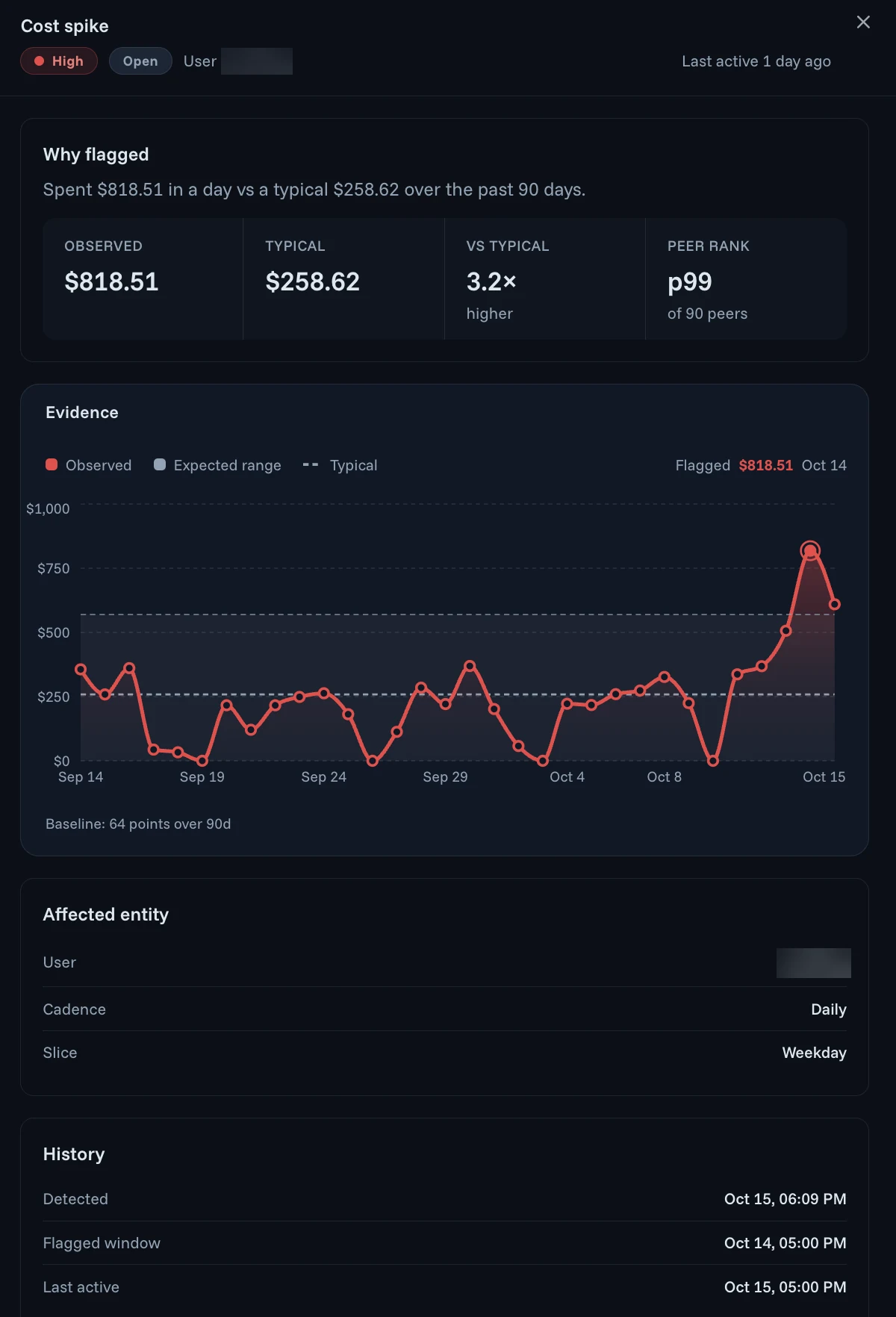
AI bills spike when an agent loops, a workflow sends far more context than expected, someone moves to a pricier model or a leaked key is used by someone else. Agent Authority flags the spike as it happens and acts on it.
- Spend baselined over 90 days and ranked against peers
- Each anomaly shows what was observed against what's typical
- Policy stops the traffic or reroutes it to a different model
- Alerts go to the tools your SOC already watches
A cost spike can be the first sign of compromise. See why your AI bill is a security signal, and how Agent Threats & Findings baselines every agent.
Roll out AI cost controls in five steps
Make the approved path the easy path: see what people use, approve the right models, then add budgets and limits that give every cost an owner instead of blocking tools outright.
Turn on visibility
Point each AI tool at one endpoint: one line per tool, no SDK. From the first calls you see the adoption curve, the agents and models each team uses and what each costs.
Approve models per team
Give each team the models it needs and keep frontier models for the work that needs them, so routine work doesn't run at frontier prices.
Set budgets and rate limits
Give each team a budget, each person a budget inside it and each agent instance a rate limit. Start with generous limits; the first goal is an owner for each one.
Cut the cost of each call
Let the MCP gateway trim what each tool call sends to the model, and route routine work to cheaper models, so growing use doesn't mean a matching growth in spend.
Review adoption and spend together
Each month, compare adoption with cost per active user by team. Reclaim idle seats, fund the teams getting value and follow up on every cost spike.
Related use cases, capabilities and articles
The same checkpoint that controls cost also carries agent identity, shadow AI discovery and data protection.
- LLM AuthorityThe gateway detail: model access by team, prompt data protection, budgets and prompt control.
- AI Agent Identity & AuthorizationThe identity every cost is attributed to, and per-call authorization for every agent.
- Shadow AI DiscoveryFind unapproved AI tools and agents, then bring them under the same policy.
- Data Protection for AI AgentsKeep customer details out of prompts and agent traffic as AI use grows.
- Your AI bill is a security signalWhy a cost spike can be the first sign of a stolen provider key.
- The delegation chain is the cost chainHow following who acted for whom attributes every agent's spend.
AI cost control and AI adoption FAQ
What is AI cost control?
AI cost control, also called AI spend management, is how a company sees, attributes and caps what it spends on AI models and tools, by team, person, agent and model, as use grows. It differs from reading a provider invoice: spend is attributed and budgets are enforced on each call, before the invoice arrives. Agent Authority does this at one checkpoint that every AI request passes through once each tool points at it, so FinOps, IT and security work from one record.
Why did our AI agent bill spike, and how do we find the agent or team behind it?
The usual causes are an agent stuck in a loop, a new workflow sending far more context per call than expected, someone switching to a more expensive model, or a leaked API key used by someone else. To find the source, attribute every call before it reaches the provider. Each request through Agent Authority carries the agent, the person behind it and the model, so spend breaks down by team, person, agent and model. Spend is baselined over the past 90 days and ranked against peers, A cost anomaly names who spiked and shows each day against its expected range, and policy can stop the traffic or reroute it to a different model.
How do you set AI budgets per team or per user?
In Agent Authority you set a budget for each team using the groups you already have in your identity provider, and a budget for each person inside it. Spend is tracked against what you actually pay your providers, and requests stop once a budget runs out. For example, Sales may use Claude Sonnet only, and its requests stop at $2,000 a month.
Can AI budgets and rate limits apply per agent, not just per API key?
Yes. Usage limits cap how often an agent can call a tool or model per agent instance, team or time window, for example 200 calls per hour for each Claude Code instance. Each limit can log the call or refuse it once its budget runs out. Because the limit follows the agent instance rather than a shared key, one runaway agent is throttled or cut off without stopping the person who started it.
What happens when a team or an agent reaches its AI budget?
Throttle is the rate and budget decision, one of the five decisions Agent Authority makes on every call: Allow, Redact, Throttle, Ask a person (CIBA) or Deny. A call over its rate limit is slowed to that limit, and once a budget runs out new requests are refused until the next period. An agent burning through tokens is cut off automatically, and every throttled call is logged with the rule that made the decision.
How do AI chargeback and showback work?
Showback reports what each team spent on AI; chargeback bills it back to that team. Both need spend attributed to the team that ran the work, which a provider invoice doesn't give you. Agent Authority attributes each call to the team, person, agent and model behind it, priced at what you actually pay, and shows real spend per active user by team, so finance has the figures for either model.
How do you measure AI adoption across the company?
Start with active users per team, then compare them with the licenses you bought. Agent Authority shows adoption against cost per active user for each team, active against idle seats, who is using their seat from quietest to heaviest, and the model mix by team. Teams under 50% adoption are called out, so you can see which teams are getting value and which seats to reclaim.
How does model routing reduce LLM costs?
Model routing sends each request to the model that fits the work. Routine tasks such as summaries, drafts and lookups go to smaller, cheaper models, and only complex work goes to frontier models. In Agent Authority the routing rules sit at the checkpoint between your AI tools and the providers, so people keep using the same tools and don't have to choose a model themselves.
How can an MCP gateway reduce token usage?
An agent connected to many MCP servers can carry a lot of tool material into the model's context on every call, and the provider charges for every token of it. The MCP Authority gateway optimizes the tool calls that pass through it, so a smaller context window reaches the model and each task uses fewer tokens. A spend cap limits the total; tool-call optimization lowers the cost of each call.
How do you encourage AI adoption without losing control of cost?
Make the approved path the easy path. Let people keep the AI tools they like, with no agent rewrite and no SDK: point each tool at one endpoint, give every team approved models and a budget, and watch adoption and spend on the same screen. Controls that attribute and limit spend, rather than block tools outright, let adoption grow while each cost has an owner.
Grow AI adoption with every cost owned
14-day free trial. Your own Agent Authority tenant, with adoption, cost by team, budgets and cost spike detection.
Run it in the SecureAuth-hosted cloud, a dedicated or private cloud, self-hosted or air-gapped.
Updated