
Agent Threats & Findings
Find your riskiest agents, and fix them first
Agent Threats & Findings turns what Agent Authority sees into action: four pillars built as one system, from risky identities and out-of-character agents to one-step containment and your SOC.
At a glance
What's in Agent Threats & Findings
- Why it's differentFindings and anomalies feed the agent's next decisionClosed loop
- Identity findingsRisky secrets and settings, ranked by severityWhy it was flagged · What to do
- Behavior anomaliesActivity and cost baselined, so spikes stand outWhy it was flagged · Evidence chart
- RespondContain one agent in one stepQuarantine · Revoke · Downscope
- SOC toolsAgent audit events streamed to your own systemsWebhooks · Delivery status
Closed loop
Findings that change what an agent can do next
A finding or an anomaly doesn't stop at an alert. It feeds the decision on the agent's next call, so what an agent has just been doing changes what it's allowed to do.
See where every tool call is decided in MCP Authority.
Anomaly
An agent's tool calls jump to six times its normal rate. It's flagged, and policy can deny its next call, with no waiting for a person or for a token to expire.
Finding
An agent identity is flagged for a secret that never expires. Policy can keep it off sensitive MCP servers until the finding is fixed.
Pillar 1 · Identity findings
Find the riskiest secrets and settings first
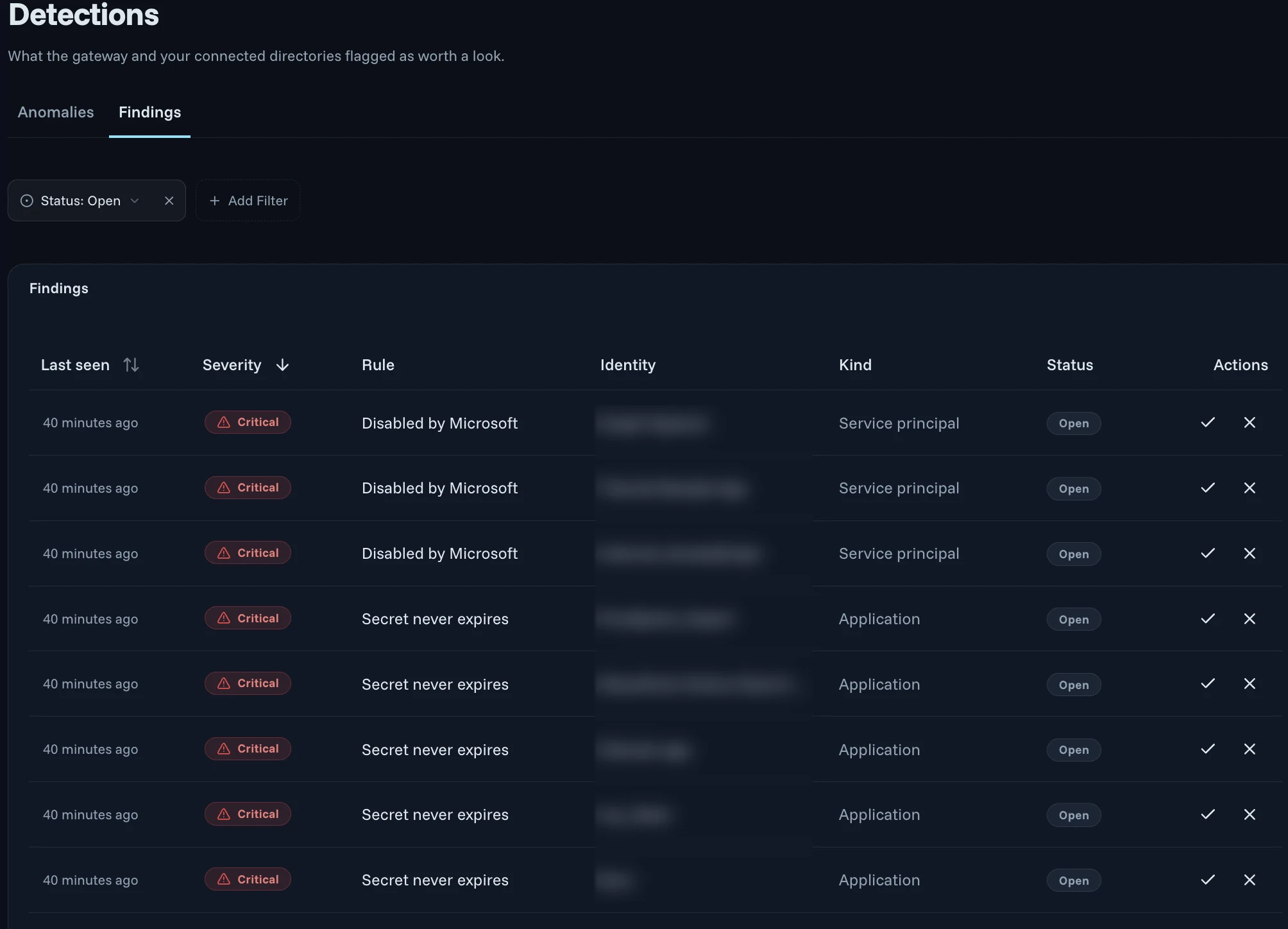
App registrations, service principals and agent identities keep multiplying, and many sign in with long-lived secrets. Agent Authority reviews them in your connected directory on a schedule.
- Each finding has a severity, the rule it broke, the identity it concerns, its kind and when it was last seen
- Rules such as a secret that never expires, or a service principal disabled by Microsoft
- Sort by severity to fix the biggest exposures first, and filter by status
- Each one explains why it was flagged and what to do next
- Directory reviews are in early access
The identities come from your NHI inventory. Read the docs.
Pillar 2 · Behavior anomalies
Spot an agent acting out of character
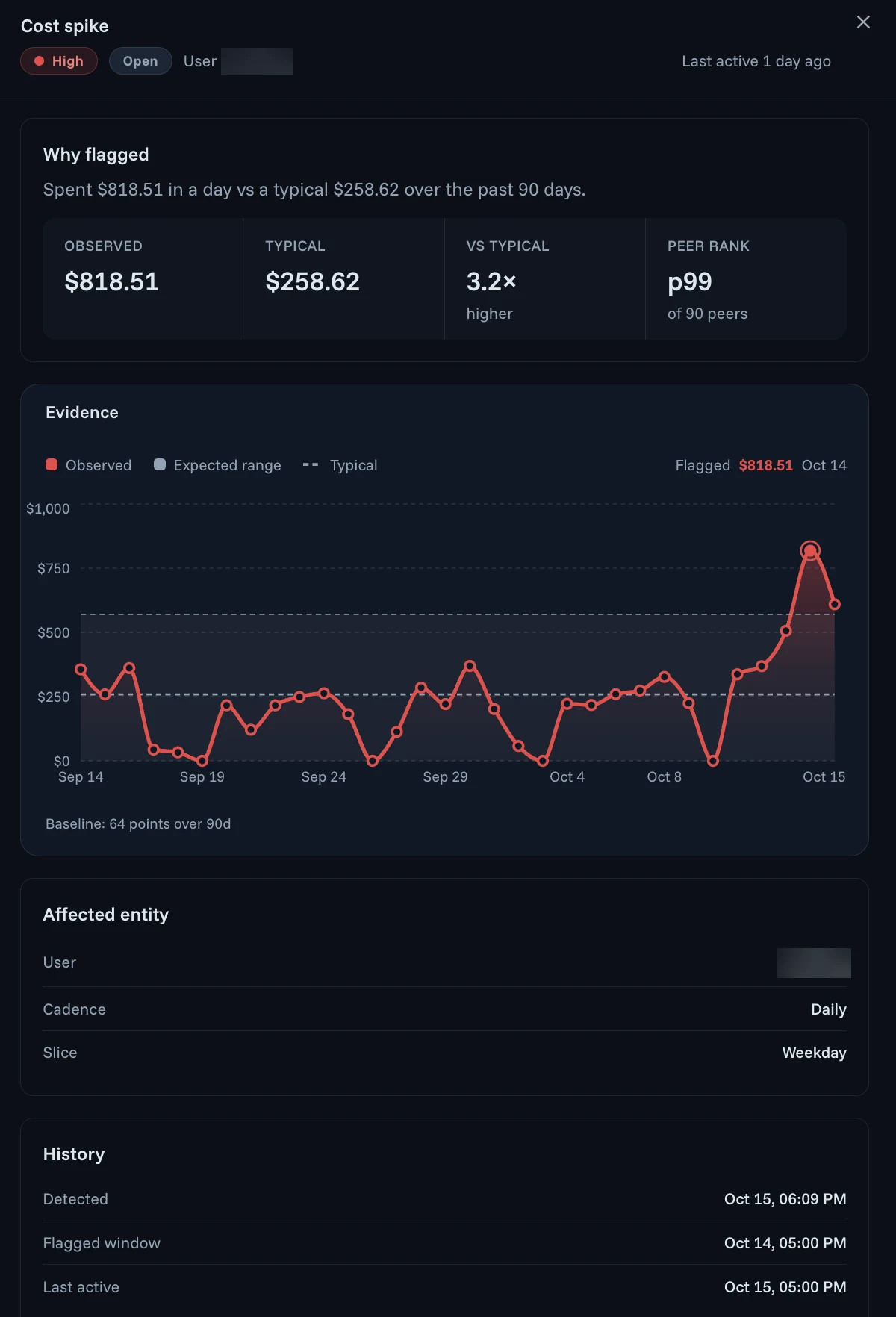
Agent activity, including what it costs, is baselined over the past 90 days and ranked against peers, so a sudden change stands out as it happens.
- See why it was flagged: what was observed against what's typical, such as $818.51 spent in a day against a typical $258.62
- How far it sits from normal, such as 3.2 times higher and p99 of 90 peers
- An evidence chart plots each day against the expected range
- Policy can deny the agent's next call
See it on tool calls in MCP Authority and on model use in LLM Authority. Read the docs.
Pillar 3 · Respond
Contain one agent in one step
Revoke, downscope or stop a single agent instance in one step, without touching the rest. Pick the level that fits the finding.
- Quarantine blocks its outbound requests within seconds
- Revoke its certificate so its connections are rejected everywhere
- Downscope it and keep it running with less access
- When an owner's account is disabled, assign a new owner or revoke the agent
Pillar 4 · SOC tools
Send it to the tools your team already watches
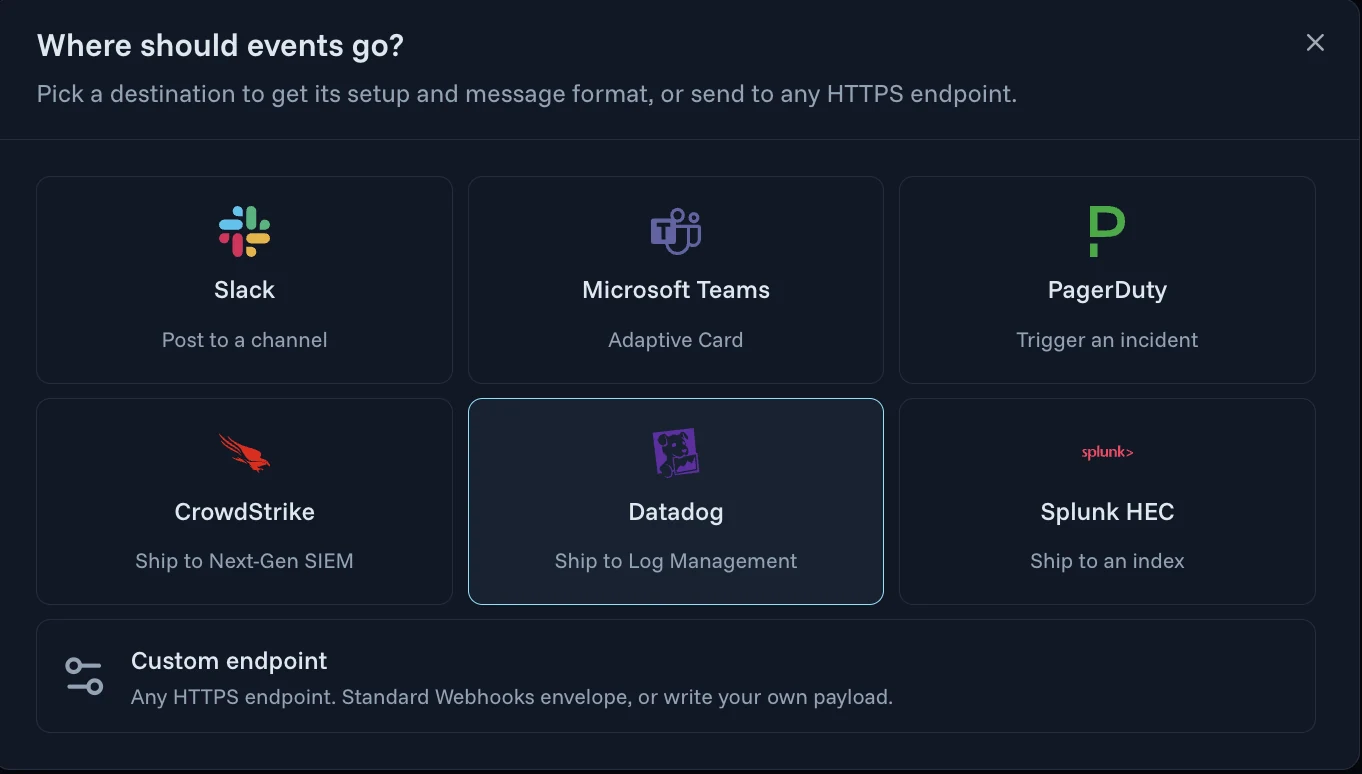
Webhooks stream agent audit events to your own systems as they happen. Pick a destination to get its setup and message format, or send to any HTTPS endpoint. Setting one up is self-serve.
- Post to a Slack channel, or send Microsoft Teams an Adaptive Card
- Trigger a PagerDuty incident
- Ship to CrowdStrike Next-Gen SIEM, Datadog Log Management or a Splunk HEC index
- Any HTTPS endpoint, with a Standard Webhooks envelope or your own payload
- Each webhook shows whether its last delivery succeeded, is retrying or failed
Related
Works with the rest of Agent Authority
- NHI InventoryWhere the identities behind every finding come from.
- MCP AuthorityWhere policy is checked on every tool call, including live risk.
- Compliance & Risk AssessmentsThe evidence you need for an audit.
Or explore all of Agent Authority.
Agent Threats & Findings FAQ
What is Agent Threats & Findings?
Agent Threats & Findings is the part of Agent Authority that finds risky agent and app identities, such as secrets that never expire, and ranks them by severity with why each was flagged and what to do. It baselines agent activity and cost so spikes stand out, contains a single agent in one step, and sends agent audit events to the tools your team already watches.
What does an identity finding tell me?
Each finding has a severity, the rule it broke, the identity it concerns, its kind and when it was last seen, and explains why it was flagged and what to do next. Sort by severity to fix the biggest exposures first, and filter by status. Rules include a secret that never expires and a service principal disabled by Microsoft. Agent Authority reviews identities in your configured directory on a schedule; directory reviews are in early access.
How are behavior anomalies detected?
Activity, including what it costs, is baselined over the past 90 days and ranked against peers. Each anomaly shows why it was flagged, for example $818.51 spent in a day against a typical $258.62, 3.2 times higher and p99 of 90 peers, with an evidence chart of each day against the expected range.
Can findings and anomalies change what an agent is allowed to do?
Yes. Anomalies are measured against each agent's own baseline, and findings flag risky agent identities. Policy can take both into account, for example by denying an anomalous agent's next call, or by keeping a flagged identity off sensitive MCP servers until the finding is fixed.
How do I contain a single agent?
Pick the level that fits the finding. Quarantine pushes a deny-all policy to the agent's enforcement sidecar and blocks its outbound requests within seconds. Revoke its certificate so its mTLS connections are rejected everywhere. Or downscope it, stripping specific permissions while it keeps running. Other agents keep running. When an owner's account is disabled, assign a new owner or revoke the agent.
Which tools can receive findings and agent events?
Webhooks stream agent audit events to your own systems as they happen: a Slack channel, a Microsoft Teams Adaptive Card, a PagerDuty incident, CrowdStrike Next-Gen SIEM, Datadog Log Management, a Splunk HEC index, or any HTTPS endpoint with a Standard Webhooks envelope or your own payload. Setting one up is self-serve, and each webhook shows whether its last delivery succeeded, is retrying or failed.
How do I get started?
Connect your directory and the first review runs on its own. Then add a webhook for the tools your team watches.
Find your riskiest agent identities first
14-day free trial. Your own Agent Authority tenant. Connect your directory and the first review runs on its own, then add a webhook.
Start free trial