


Security teams can now ask SecureAuth Agent Authority about their AI agents from Claude, ChatGPT or any other AI assistant that supports MCP. The assistant passes the question on, and Agent Authority answers it: which rules cover Salesforce, say, or which calls it denied today. Each answer is limited to what the person's role allows.
What matters for security is how the assistant is authorized when it acts. Agent Authority runs each call on behalf of the person the assistant belongs to, with that person's roles, and the audit log records each call with both the assistant and that person.
A shared admin account can hide who asked the assistant to act
Gartner predicts that 40% of enterprise applications will include task-specific AI agents by the end of 2026, up from less than 5% in 2025. As agents take on admin work, each one needs a way to authenticate to the systems it manages.
A common shortcut is a shared admin account. If the audit log records only that account, you can't tell who asked for each action.
Agent Authority uses delegated authorization instead. Each call runs on behalf of the person the assistant belongs to, so access follows that person's roles.
How agent authorization works for admin tasks
To Agent Authority, an AI assistant is an AI agent like any other: it has its own credential and belongs to a person. For admin tasks, Agent Authority includes a built-in resource, an MCP server named SecureAuth Agent Authority. It turns the product's management API into tools your assistant can call, one tool per API operation. This post calls them the management tools.
- Install the resource. An admin goes to Tools & Services in the Agent Authority console, clicks Add Resource, selects SecureAuth Agent Authority and clicks Install SecureAuth Agent Authority. You don't create an app or sign in again. The gateway already knows who each agent belongs to from the agent's own credential.
- Check that your rules allow it. New organizations start with an Allow all rule, so the resource works right away. If your organization no longer has that rule, add an allow rule for the resource and check its position in the Impact Preview, because the first matching rule wins.
- Ask the assistant to "list my agents." If your agents come back, the connection works.
From then on, each call runs with the owner's roles. The assistant gets only the tools those roles allow, and your access control rules, response filters and usage limits apply to every call, as they do for any other service.
- A person asks their assistant
- The assistant calls the management tools
- The call runs with that person's roles
- The audit log records the assistant and the person
Requests you can make through your assistant
- "List my agents."
- "Which rules cover Salesforce?"
- "Show today's denied calls and the tools they tried to use."
- "Who are the top five users by AI cost?"
- "Would this agent be allowed to send a Slack message?"
- "Create a rule that blocks Slack sends for everyone."
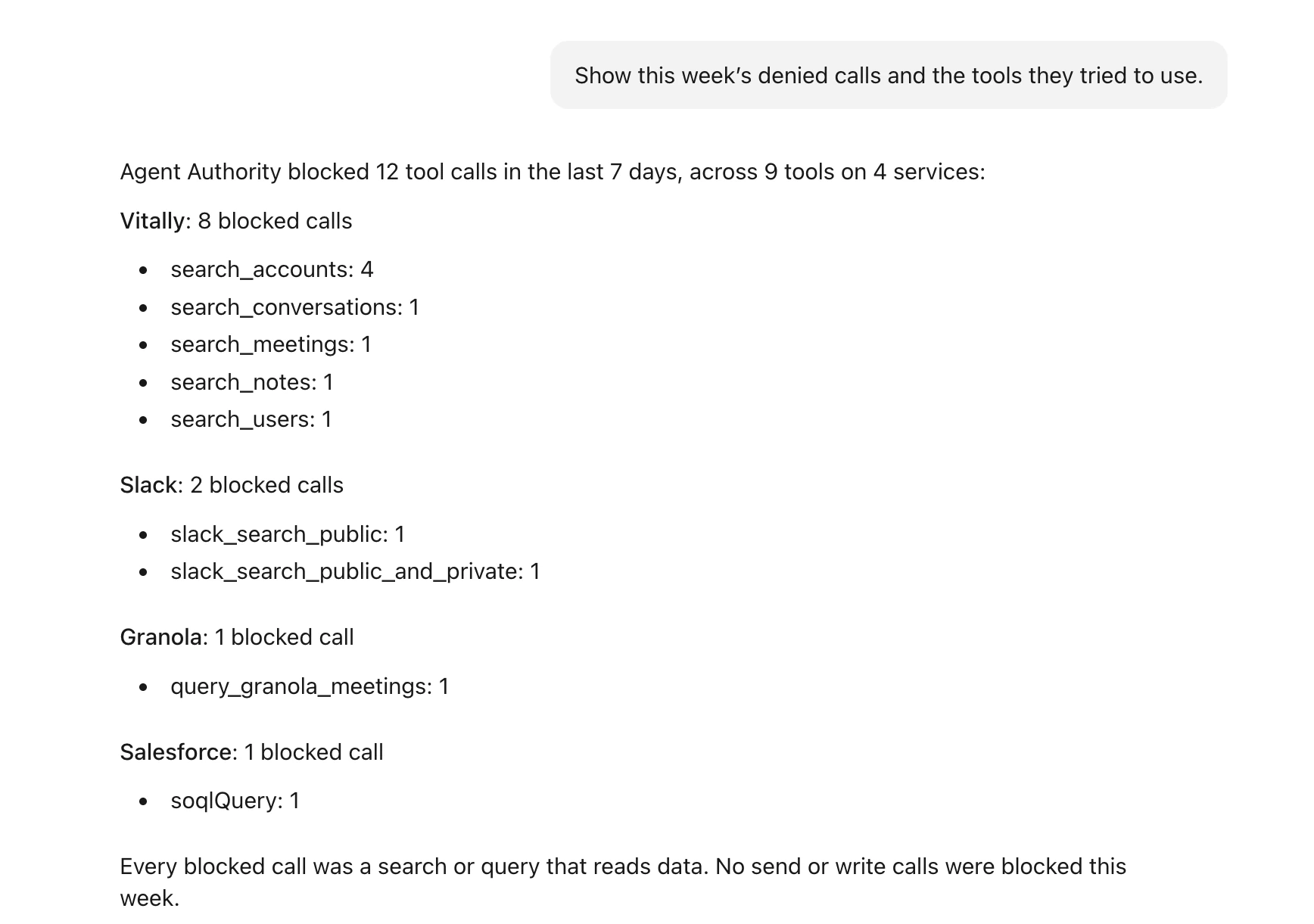
What the assistant can do depends on the person's role
Roles set which tools the assistant gets. Your access control rules, which can allow or deny tools by tag, then decide which of those calls go through.
- A user who asks for the top users by AI cost gets one row: their own. Their assistant sees their own agent instances, activity and cost. It can also list the services the person can reach, without their connection details or tools.
- A viewer gets organization-wide lists, activity and anomaly findings, and can check whether any agent would be allowed to use a tool. A viewer's assistant can't change rules, API keys, roles or other organization settings.
- An admin can ask the assistant to block Slack sends for everyone. The assistant creates a deny rule for the
slack_send_messagetool, named exactly, so drafts (slack_send_message_draft) stay allowed. It then checks an agent against your rules to confirm that sends are denied and drafts are allowed. The rule applies from each agent's next call.
An agent owned by the organization, not by a person, gets none of the management tools.
In short, the person's role sets what their assistant can reach:
- UserTheir own agents, activity and cost
- ViewerReads across the organization
- AdminAll tools, within your rules
- Agent owned by the organizationNo management tools
Trace each assistant change in the audit trail
When an assistant changes a setting, open Agent Trail in the console. To see who asked for the change, find the tool call that made it: that entry names the assistant, such as Claude Code, and the person it acted for. The entry for the change itself names only the assistant, and a change made directly in the console names the person, so you can tell the two apart.
Keep AI agents from rewriting policies or creating API keys
An admin's assistant can change rules, create API keys and change role assignments. An API key it creates works with the management API directly, outside your gateway rules.
For reviews and routine checks, use the viewer role. If an assistant needs admin access, add deny rules on the SecureAuth Agent Authority resource. New deny rules go to the top of the list by default, and an allow rule placed above them still wins.
- Deny the changes you don't want an assistant to make. Deny the tools that create, update or remove rules, and the tools that create API keys or change role assignments.
- Deny destructive tools. Each management tool is tagged read-only, write or destructive by default. A deny rule on the destructive tag blocks the tools that remove, revoke or rotate things. It doesn't block write tools, so on its own it doesn't stop role changes.
Get started
You need:
- An Agent Authority organization. New to Agent Authority? Start a free 14-day trial.
- An AI assistant that connects through Agent Authority, such as Claude.
- The SecureAuth Agent Authority resource, installed from Tools & Services.
Full steps are in the SecureAuth Agent Authority resource docs.
FAQ
What is agent authorization?
Agent authorization decides what an AI agent may do when it acts, and on whose behalf. In Agent Authority, each call an AI assistant makes to the management tools runs on behalf of the person it belongs to, within their roles and your access control rules. Agents owned by the organization get none of the management tools.
How do you audit what an AI assistant does on behalf of a user?
An audit record for delegated access should name both the agent that made a change and the person it acted for. In Agent Authority, the Agent Trail entry for each tool call names the assistant, such as Claude Code, and the person it acted for. The entry for the change itself names the assistant, and a change made in the console names the person instead.
How do you stop an AI assistant from changing access policies?
A deny rule blocks the tool calls it matches, unless an allow rule above it matches first; new deny rules go to the top of the list by default. Deny the tools that create, update or remove rules on the SecureAuth Agent Authority resource, or give the person the viewer role, whose assistant has no tools that change rules.
Sources
- Gartner, Gartner Predicts 40% of Enterprise Apps Will Feature Task-Specific AI Agents by 2026, Up from Less Than 5% in 2025, August 26, 2025
- SecureAuth docs, SecureAuth Agent Authority resource
- SecureAuth docs, Roles