


An AI agent gets work done by calling tools. Some calls do damage on their own, such as deleting a Salesforce account or removing a Jira project. You never want an agent to make them.
Other calls are ones you choose to allow, such as updating Salesforce records or reading customer records to answer support questions. Customer records hold personal data, so allowing that access is a deliberate choice. Even then, the risk is in volume: the same tool called again and again by an agent stuck retrying, by an instruction applied more broadly than intended, or page after page until the reads add up to an export.
SecureAuth Agent Authority handles both. Agents reach their tools through the Agent Authority gateway, which checks every call against your access control rules before it runs. Deny rules block the actions you rule out. Usage limits, sometimes called rate limits, cap how many of the calls you allow can pass in a window of time.
Why the volume of agent actions is a risk
Routine calls become a problem when they add up:
- A data pull. An agent pages through a system. Each read is allowed; together they are an export.
- A mass change. A bad or misread instruction is applied record by record.
- A loop. An agent retrying a failed step runs up charges on a paid API, uses up a service's quota, or takes capacity other people need.
AI agent authorization decides one call at a time, so a sequence of allowed calls is allowed. Usage limits control how many of those calls get through.
Deny rules for the agent actions you never want
Every catalog tool in Agent Authority carries a built-in tag for what it does: read-only, write or destructive, plus external if it reaches outside your organization. A deny rule can target a tag instead of a list of tool names, for example to deny destructive tools for contractors, or external tools for every autonomous agent.
Tools on your own MCP (Model Context Protocol) servers, and tools a provider adds to a catalog service, are tagged once, when Agent Authority discovers them, from hints the server publishes. Those hints aren't verified, and a tool with no hints gets no tags until you assign them. A deny rule on a tag doesn't cover an untagged tool, so check these tags before you rely on them.
Which rule wins
Rules are checked from the top of the list down, and the first match decides the call. New rules are placed so they don't weaken the ones you have:
- A new deny rule goes to the top, so it's checked before any allow.
- A new allow rule goes to the bottom, so it can't override an existing deny.
A contractor’s agent calls a Salesforce delete tool
tagged destructive- 1DenyDestructive tools for ContractorsFirst match: call denied
- 2DenyExternal tools for Autonomous agents
- 3AllowSalesforce tools for EveryoneWould also match, never reached
- 4AllowRead-only tools for Everyone
You can move a rule anywhere. Before you save, the preview shows where it lands, which rules of the opposite effect it overrides, and which rules above it win first, with a warning when an allow would win over a deny. Every rule move is recorded in the audit log. Changes apply to each agent from its next connection; a session that's already open keeps the rules it connected with.
Usage limits for the agent actions you allow
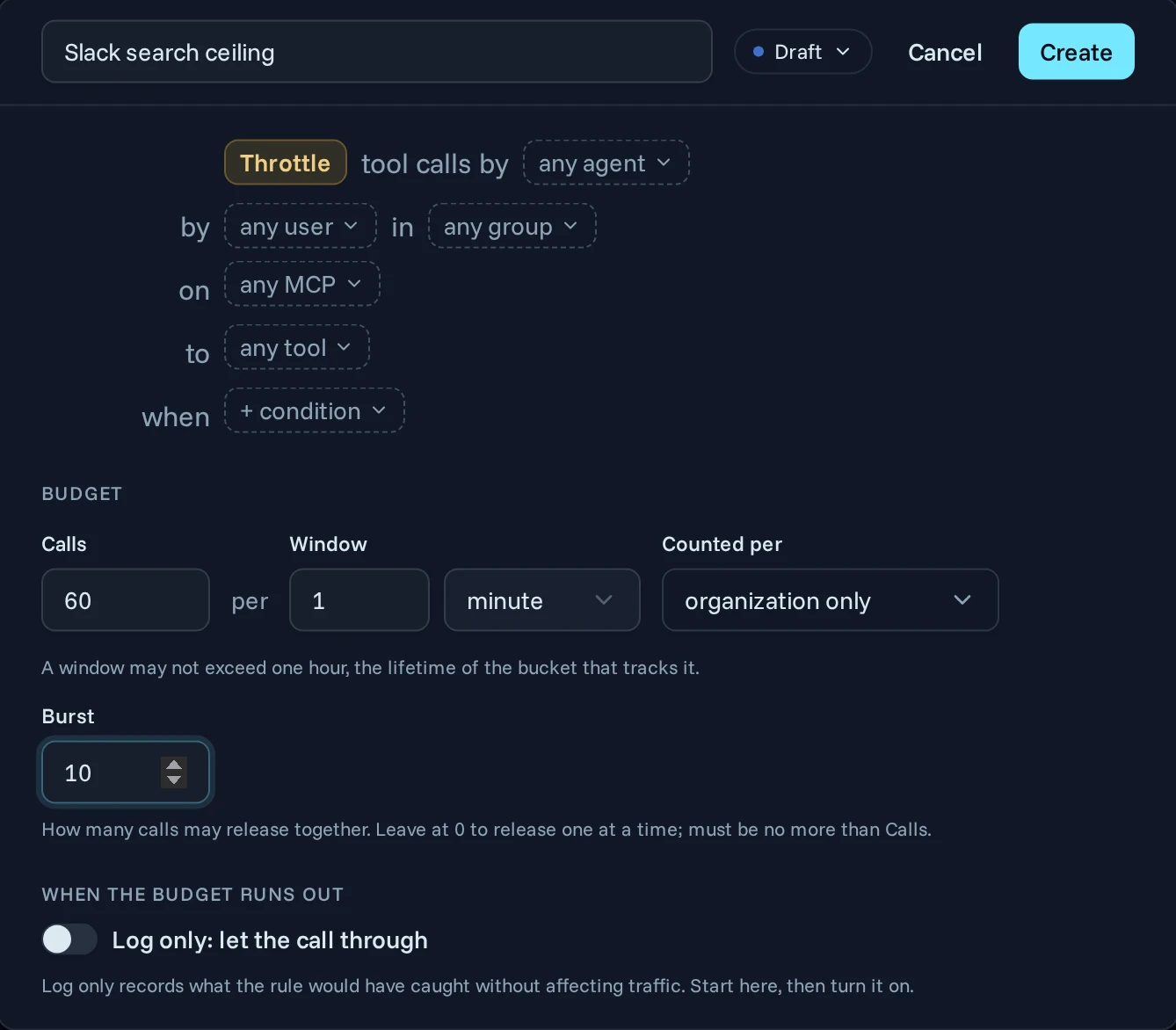
You set usage limits on the Usage Limits page. Each one answers three questions:
- Which calls? Scope it by service, agent, user, group, tag or tool, the same way you scope an access rule.
- How many? For example, 60 calls an hour, in a window of up to an hour. The gateway spaces the calls evenly, about one a minute here, unless you allow bursts.
- Whose budget? By default the whole organization shares one budget. You can split it per user, agent instance, service or tool, or a combination. Sixty calls an hour for each user is a very different control from 60 shared across the company.
A limit counts calls, not the records each call changes.
Use dynamic authorization for riskier calls
Dynamic authorization means each call is checked as it happens, using the details of that call. In Agent Authority, a usage limit can carry a condition that does this. The condition looks at who is calling, which agent and tool are involved, what the call asks for and where it came from, and the limit applies only to calls that match. For example:
- Contractors get 50 calls an hour to Salesforce's update tools.
- Calls from outside the office network get a lower limit than calls from inside it.
- Autonomous agents, which have no person behind each call, get their own limit on write tools.
If a condition can't be evaluated, the limit applies anyway.
Combine an organization-wide limit with per-user limits
Limits don't override each other. A call needs budget left under every enforced limit that matches it, and if any has run out, the call is refused. So an organization-wide budget of 1,000 calls a minute and a per-user budget of 50 work together: no single user can spend the whole organization's budget.
Only calls that reach the service count. A call an access rule already blocked costs nothing.
Test before you enforce
The right number is hard to guess, and one set too low blocks real work. Start a limit in log-only mode: it counts calls and records the ones it would have refused, without refusing any. The Agent Trail marks those calls as logged, not blocked, with the limit's name. After a normal period of work, adjust the number and switch the limit to deny.
When an enforced limit refuses a call, the agent gets a failed tool result that names the tool and says when to retry. The Agent Trail shows the refusal and the limit that caused it.
How to roll out deny rules and usage limits
- Decide which groups, if any, should use destructive tools, and deny the destructive tag for everyone else. First check the tags on tools from your own servers and on tools that providers added to catalog services.
- Add usage limits in log-only mode, split by user, on tools whose calls read or change many records.
- After a normal period of work, set each number and switch to deny.
- Consider a separate limit for autonomous agents. Broader limits that match their calls still apply.
- Look into spikes in refused calls.
Get started
Deny rules and usage limits are available to every Agent Authority organization. New to Agent Authority? Start a free 14-day trial.
Full details are in the docs for access policies and usage limits.
FAQ
What is a rate limit for AI agents?
A rate limit for AI agents caps how many tool calls can pass in a window of time. Agent Authority calls these usage limits. The budget is shared across the organization by default, or split per user, agent instance, MCP server or tool. A new limit can run in log-only mode first, so you see what it would refuse before you enforce it.
How does dynamic authorization apply to AI agent access?
Dynamic authorization means each tool call is checked as it happens, using the details of that call. In Agent Authority, an access rule or usage limit can include a condition about who is calling, which agent or tool is involved, what the call asks for, or where it came from. For example, you can set a tighter limit for calls from outside your office network.