
YubiKey FIDO2 already provides strong protection against phishing and credential theft. Organizations with strict security requirements also need to control which devices users are allowed to use. How do you stop employees from registering a personal YubiKey bought online, or a key issued for the corporate network in a restricted environment? Without a way to identify individual security keys, organizations have limited control over which devices can be registered.
Enterprise Attestation for YubiKeys is now available in SecureAuth. Other identity providers restrict FIDO2 registration by key model. Say, for example, an employee buys a YubiKey 5 NFC online and registers it as their work authenticator. Because it's the model your organization approved, FIDO2 policy accepts it. Enterprise Attestation in SecureAuth blocks that registration by checking each key's serial number against your approved inventory.
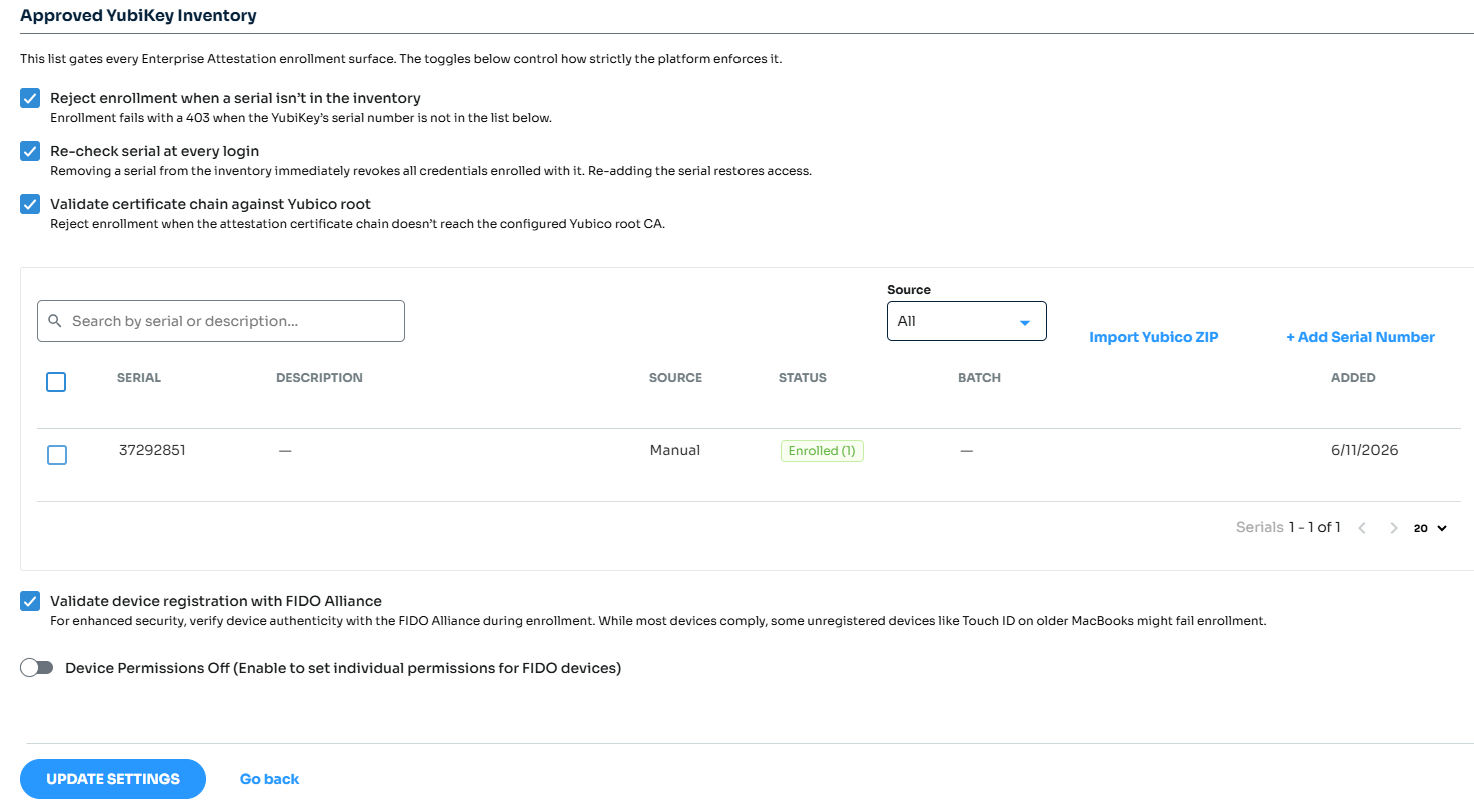
With Platform Managed Enterprise Attestation for YubiKey, you approve keys by their unique serial number, so you know which YubiKey each employee uses and whether it belongs in that environment. When a key is lost or an employee leaves, removing its serial number from the list turns off its credentials at the next sign-in.
Why model-level control isn't enough
The Authenticator Attestation GUID, or simply AAGUID, uniquely identifies the authenticator's make (manufacturer) and model. It does not uniquely identify the specific authenticator. The AAGUID is returned by the authenticator when attestation is requested by the relying party (RP), and the RP may use it to determine whether the authenticator's make and model meets its policies.
The gap matters most for organizations that run more than one environment, such as a corporate network and a separate air-gapped or classified network. Even though both environments may use the same YubiKey model, the organization may require completely separate device inventories. Without individual device validation, there's no reliable way to enforce that separation during registration.
Enterprise Attestation is how FIDO closes that gap. As the FIDO Alliance white paper FIDO Attestation: Enhancing Trust, Privacy, and Interoperability in Passwordless Authentication explains, Enterprise Attestation binds an authenticator to a unique identifier, such as its serial number, so an organization can manage and trace the specific keys it issues.
What's new: Enterprise Attestation checks each YubiKey device at registration
With Platform Managed Enterprise Attestation, SecureAuth can validate the identity of an individual YubiKey during registration and check whether it's approved for that environment.
Here's how it works:
- Admin uploads approved YubiKeys. The administrator uploads a list of approved YubiKey serial numbers into SecureAuth Identity Platform.
- User registers their YubiKey. When a user registers a YubiKey, SecureAuth requests Enterprise Attestation as part of the FIDO2 registration process.
- YubiKey identifies itself. The YubiKey provides attestation information, including its unique serial number.
- SecureAuth verifies the YubiKey. SecureAuth validates the device's authenticity using Yubico's trusted certificate chain.
- SecureAuth checks the approved list. The serial number is compared against the inventory uploaded by the administrator.
- Only approved YubiKeys can be registered. If the serial number matches an approved device, registration continues. If it doesn't, SecureAuth blocks the registration.
The important difference is that SecureAuth isn't just checking whether the device is an approved YubiKey model. It's checking whether that specific YubiKey is approved for use.
Simple for administrators to manage approved YubiKey inventory
Administrators can enable Enterprise Attestation through the SecureAuth FIDO configuration and manage approved devices directly from the admin console.
They can upload device certificates in bulk, manage individual serial numbers, and review inventory information to help track which devices are approved.
The same registration controls apply whether users enroll through self-service, a dedicated enrollment page, or a helpdesk-assisted process.
This gives security teams a consistent way to enforce device registration policies without relying entirely on manual inventory checks.
SecureAuth also re-checks the serial number at every sign-in. If a key is lost or an employee leaves, remove its serial number from the list, and the credentials enrolled with it stop working at the next sign-in.
What device-level control gives security teams
Enterprise Attestation helps organizations move from simply allowing approved security key models to controlling the specific devices that employees can register.
That provides several practical benefits:
- Stronger control over device registration. Only YubiKeys approved by the organization can be registered.
- Better separation between environments. A key approved for one environment can't register in another unless you add it there.
- Protection against unmanaged devices. Employees cannot register personal or unapproved YubiKeys simply because they're the correct model.
- Lost keys stop working. Remove a serial number, and its credentials stop working at the next sign-in.
- A clear record for audits. Security teams keep one list of approved keys and can see which ones are enrolled.
For security teams, this means greater confidence that the authentication devices being used are the same ones the organization has purchased, approved, and assigned. Employees register their approved YubiKey the same way they do today.
Get started
To get started, you need:
- SecureAuth Identity Platform release 26.2.0 or later
- YubiKeys ordered from Yubico with Enterprise Attestation, plus the attestation certificates Yubico provides
- Your approved key list imported into SecureAuth
For setup steps, see our Configure YubiKey Enterprise Attestation guide.
Why approved keys matter for phishing-resistant passwordless sign-in
Zero trust starts from a simple rule: never assume trust, always verify it. Passwordless FIDO2 authentication verifies the user with a phishing-resistant credential that is bound to your domain and can't be guessed, reused or handed to an attacker. That takes the most stolen credential in the enterprise, the password, out of the picture.
But a credential is only as trustworthy as the device that holds it. Attestation extends verification to the authenticator itself. Enterprise Attestation goes one step further and proves the credential lives on a specific YubiKey your organization bought, provisioned and assigned to that environment. With the serial re-checked at every sign-in, removing a key from your approved inventory revokes the credentials enrolled with it at the user's next sign-in.
Together, passwordless and attestation turn every sign-in into proof of three things: the right person, a phishing-resistant credential, and an approved device. That's the foundation of a zero trust journey. With SecureAuth, every key your users sign in with is a security key your organization has approved.
FAQ
What are phishing-resistant MFA methods?
Phishing-resistant MFA methods use FIDO2 and WebAuthn credentials that are bound to the site they were created for, so a fake sign-in page can't capture or replay them. They include hardware security keys such as YubiKeys, and passkeys stored on a laptop or phone. Because each one combines something you have with a PIN, fingerprint or face, it counts as multi-factor on its own, with no password needed. MFA that relies on one-time codes or push approvals doesn't meet this bar, because a user can still be tricked into handing them over. For employees, YubiKeys are a common choice because the credential stays on a physical key the organization issues, and with Enterprise Attestation, SecureAuth can confirm each one is a key you approved.
What is FIDO Enterprise Attestation?
Enterprise Attestation is a FIDO2 and WebAuthn feature that lets a security key identify itself individually during registration, for example by its serial number. Standard attestation proves only the key's make and model. Because a unique identifier could be used to track a key across sites, Enterprise Attestation is released only to services an organization has authorized, such as its own identity provider.
How is it different from restricting keys by AAGUID?
An AAGUID identifies a key's make and model, so every YubiKey of the same model shares it. Allowing keys by AAGUID lets you require an approved model, but it still accepts any key of that model, including one an employee bought online. Enterprise Attestation checks each key's serial number against your approved inventory, so only the keys you issued can register, and removing a serial number stops that key's credentials at the next sign-in.