
Agent Authority
For access control and security across AI agents and non-human identities
Agent Authority early access
Shadow AI and NHI
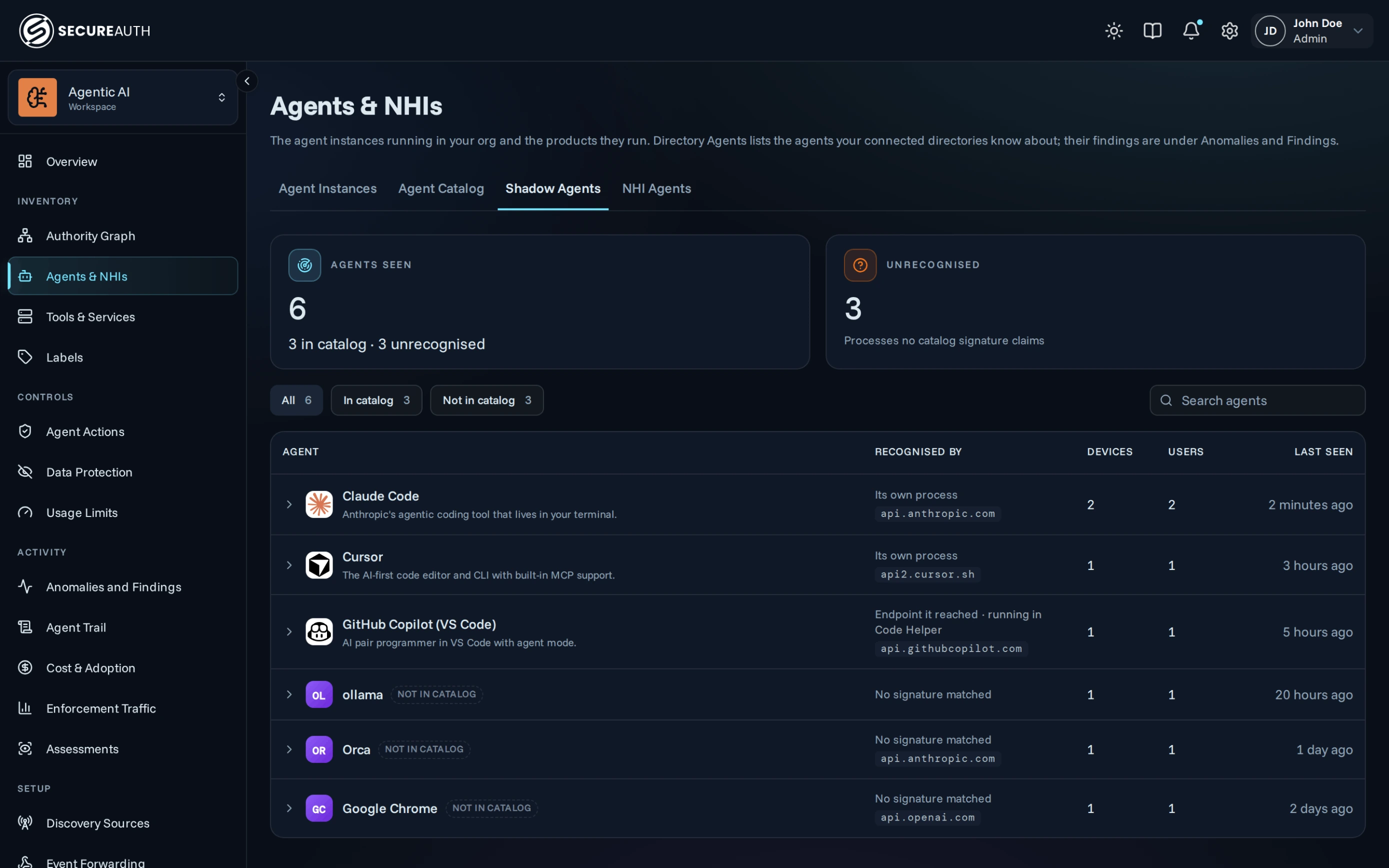
Shadow agent and NHI discovery on employee machines: see the AI agents running across your systems
Sensors on macOS machines now report the AI agents users run, such as Claude Code, Cursor or GitHub Copilot, with the number of devices and users for each, so you get a real count of unmanaged AI use.
Non-human identities
Risky app and AI agent identities in Microsoft Entra: find the riskiest secrets and settings in your directory
App registrations and agent identities keep multiplying and often sign in with long-lived secrets and no MFA. Agent Authority now reviews them in your Entra directory on a schedule with twenty checks, and each finding explains why it was flagged and what to do next. Sort by severity to fix the biggest exposures first, without digging through the Entra admin center.
General availability
Administration
Administer Agent Authority from your AI assistant: hand admin tasks to Claude or another MCP-compatible assistant
The admin console now exposes an MCP server. Connect Claude or any MCP-compatible client and ask it to update a policy or review audit events, instead of clicking through the console.
Agent Graph
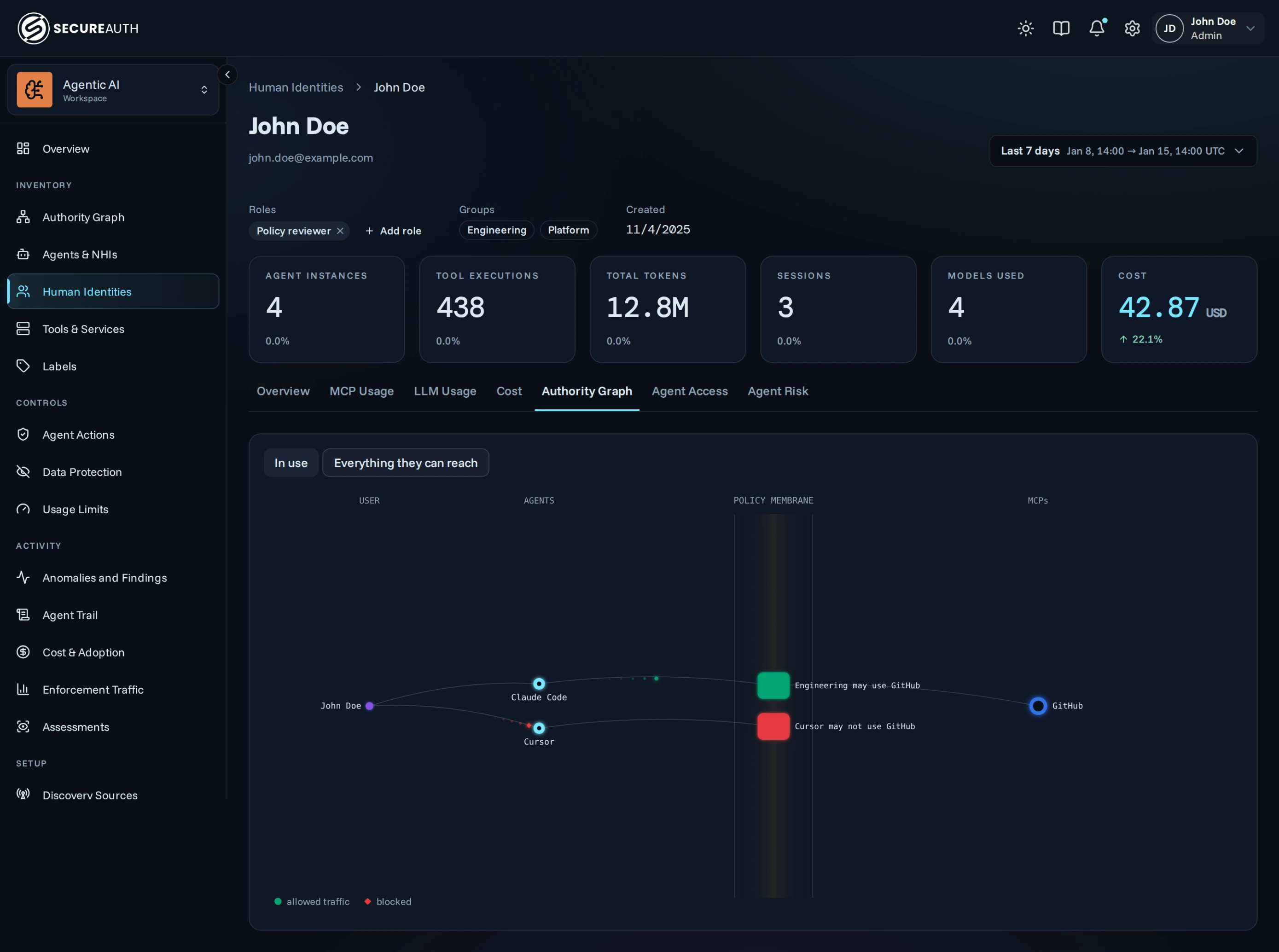
User access view: see which services each user's AI agents can reach
Each user's page now has an Authority Graph tab that maps their agents to the services they reach:
- See what a user's agents actually use. One view shows the agents, policies and services with traffic from this user in the date range you pick.
- See everything a user's agents could reach. A second view adds idle agents and every service their policies cover, so you can cut access that goes unused.
Risk assessment
Agent Access and Agent Risk assessments: see which sensitive services each identity's agents reach
Assessments rank the identities whose agents carry the most risk:
- See who reaches sensitive data. Agent Access lists first the identities whose agents reach the most regulated services, so reviews start where the risk is highest.
- Find the agents that could do the most damage. Agent Risk ranks identities by how much their agents can change, so you can cut excess write access first.
Access management
Custom roles and API keys: give people and integrations only the access they need
Build custom roles from the built-in permissions and assign them on each user's page, and create API keys in Settings for scripts that call the Agent Authority API:
- Fit access to each task. A reviewer role can read the audit log and policies without editing them, some permissions can be limited to a user's own items, and each key gets only the permissions it needs, so a leaked key can do less damage.
- Extend access without disruption. Assigned roles add to the role from your identity provider, and keys keep their permissions when people change roles, so integrations keep running.
- Stay in control. Role managers and key creators can grant only permissions they hold, so they can't make themselves admins. Rotating a key retires the old secret immediately, and keys can be revoked or set to expire.
Workforce Authority (SAIDP)
For employee and contractor sign-in across your workforce
Contact your Customer Success Manager to plan your upgrade.
Account takeover protection
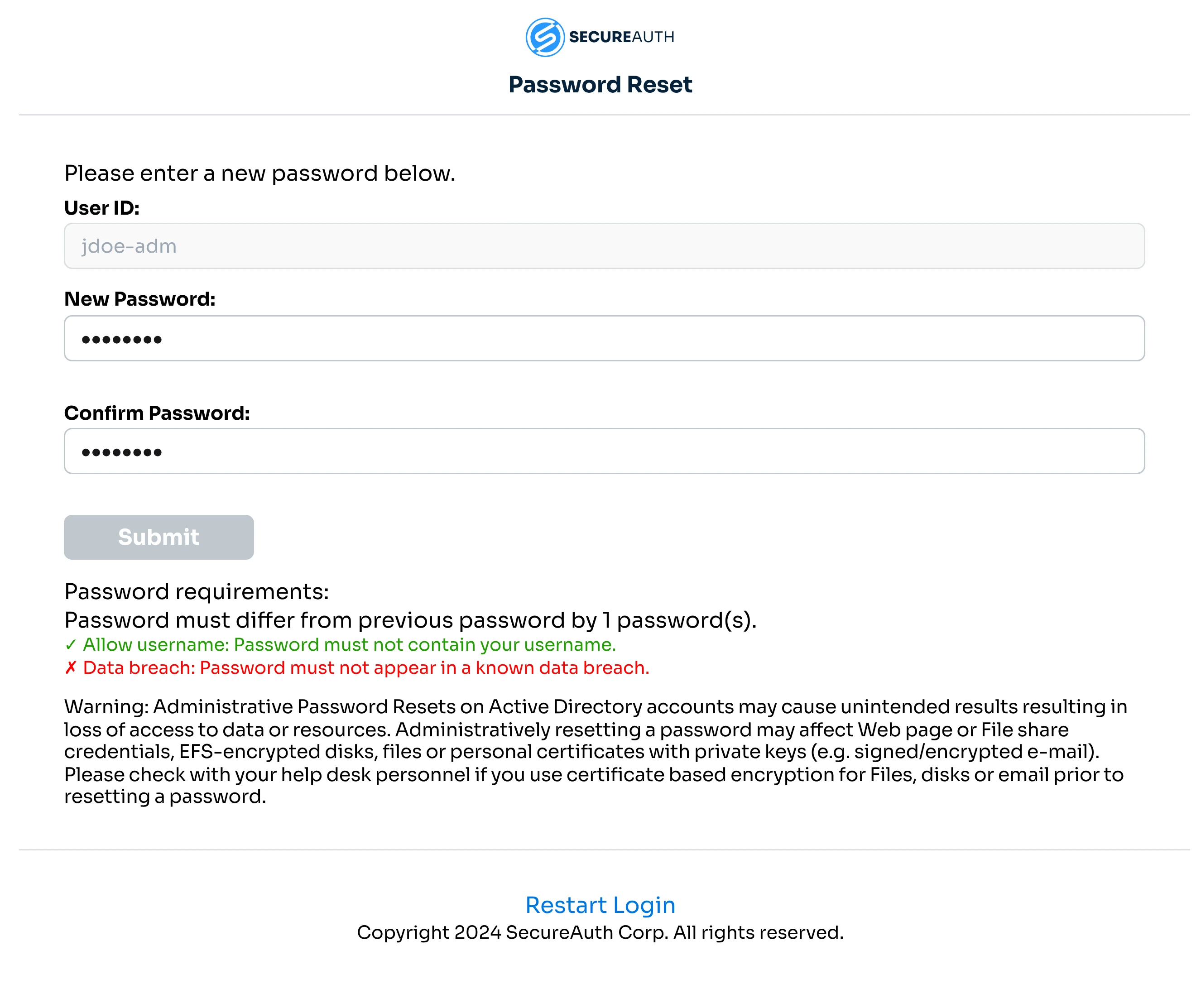
Password breach detection: block passwords that already appear in public breaches
New passwords are now checked against compromised breach data when they are set:
- Block exposed passwords when they’re set. Password resets and changes are screened, and users are told why and asked to pick another.
- Turn it on when you’re ready. It’s off by default, set per password policy and included with the Prevent package, with each detection in the audit log.
Risk-based prompts
Adaptive MFA: match the MFA method to the risk of each sign-in
Adaptive MFA is now smarter about how it challenges users. It matches the MFA method to the risk of each sign-in, so you can offer a simple push when risk is low and only phishing-resistant methods when risk is high.
Read the release notes (opens in a new tab)User access
Voice OTP for help desk verification: verify callers with a code by phone call
Help desk staff can now verify a caller with a one-time code sent by voice call to their registered phone, alongside SMS and Mobile Authenticate:
- Verify more callers. Landline-only users, shared desks and anyone without SMS or the app can now be verified, with fewer fallbacks to weaker checks.
- Turn it on when ready. Voice OTP is opt-in per phone number, so your existing configuration stays as it is.
Admin control
Blocked IP management: unblock IPs yourself, without contacting support
Password spray detection blocks an IP after failed sign-ins across many accounts, which testing, a busy office or a VPN can also trigger. You can now see the list of blocked IPs and unblock them yourself, with no support case.
Read the docs (opens in a new tab)SecureAuth RADIUS Server
For VPNs, network devices and other systems that sign users in over RADIUS
Security
Security updates: upgrade to 26.01.00 to clear log4j scan findings
Upgrade to SecureAuth RADIUS Server 26.01.00 to get updated third-party libraries, including log4j. If a vulnerability scan has flagged log4j or another library on one of your RADIUS hosts, this upgrade resolves the finding.
Read the release notes (opens in a new tab)Questions or want to know more?
Reach the product team directly at product@secureauth.com.