Agent Authority
Zero trust for AI agents.
Securely adopt AI agents faster. One control layer to govern access at the moment agents take action.
The problem
Agents make autonomous decisions and act on them
Every way an agent differs from a user is a business risk.
A user can spot a bad instruction and stop
An agent will execute a malicious instruction
CompromisedA user follows a process
An agent improvises to reach its goal
DestructiveA user has one identity
An agent acts as many without a chain back to the delegating user
UnaccountableA user needs approvals to spend
An agent spends unmetered and unapproved
Expensive
Capabilities
Control agent access and action from discovery to record
With Agent Authority find every agent, decide each action it takes, protect the data it touches, cap what it spends, and keep a record of all of it.
Control AI usage across systems
One authority for every path an agent takes
Where AI runs

Agent Authority
One policy on every path
What it reaches
Employees and desktop agents
Endpoint Security
Discover AI apps, block unsanctioned tools
- Shadow AI discovery
- App control
- Device posture
Local files and shadow AI
Agents calling tools over MCP
MCP Gateway & Security
Authorize every tool call, scoped to the task
- Tool authorization
- Task scoping
- Context-aware policy controls
Enterprise apps and data
Prompts from users and agents
LLM Security
Redact sensitive data, stop prompt injection
- Data redaction
- Injection defense
- Token limits
Model providers
Agent identity & discovery
Every other control depends on knowing which agent is acting and which user it is acting for. A rule that only knows the user cannot tell Claude Code from a rogue script using the same credentials.
One register of every agent in use, each with a named owner.
Find agents that were never registered, on devices and in SaaS.
The service accounts, API keys and tokens agents rely on, surfaced and mapped.
Every agent action traced to the person it acts for, or the team that owns it.
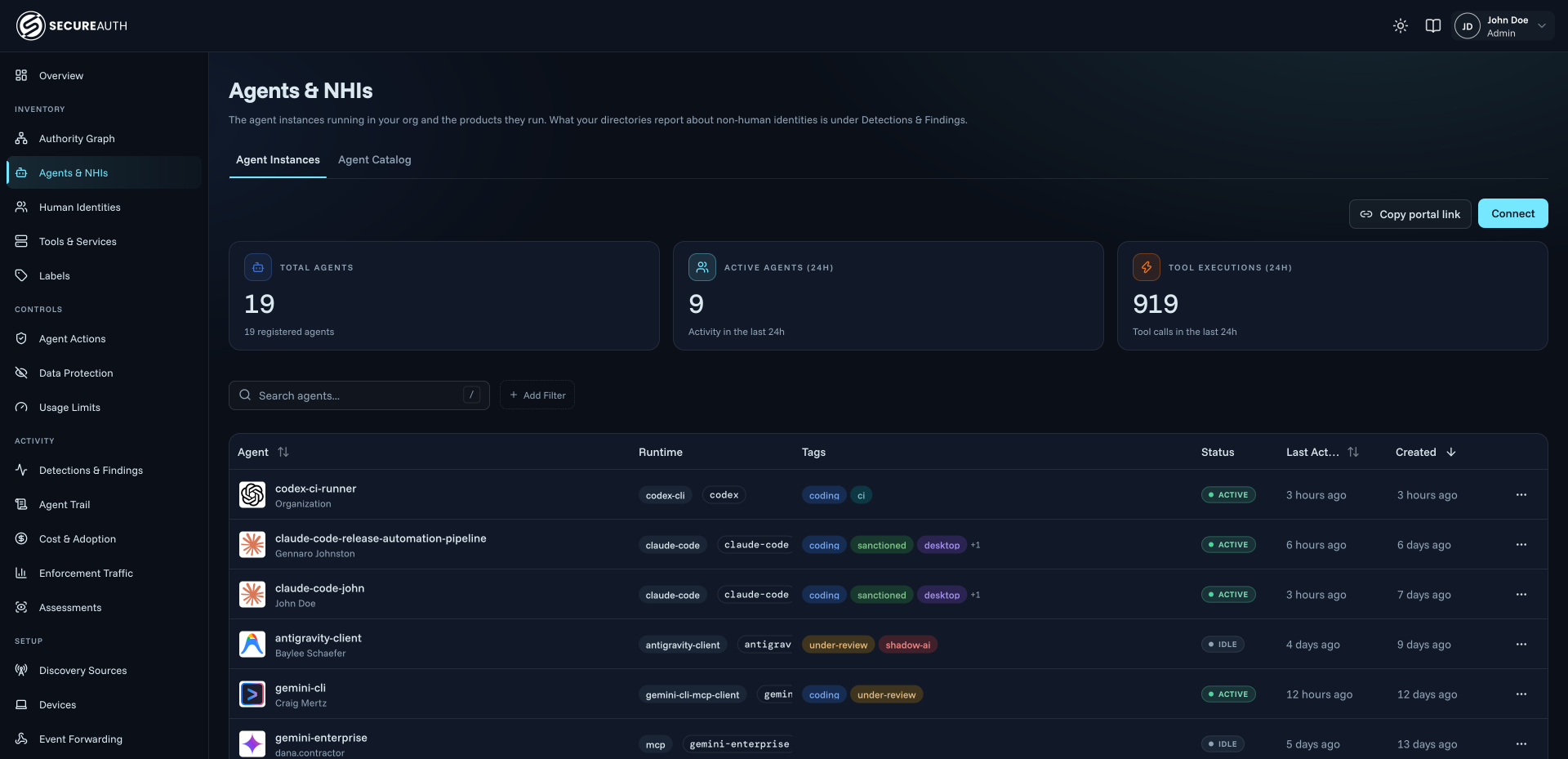
Agent inventory & ownership, 1 of 4
Runtime authorization & enforcement
Every call is decided as it happens, based on the agent acting, the delegating user and the context. Then a call is allowed, denied, or escalated to a person.
Every tool call is checked against policy before it runs, down to the operation and its arguments.
Agents reach only the systems, endpoints and data sources their policy allows.
Each call is weighed on who is asking, the task, the data involved and its risk, not just a static role.
Revoke, downscope or stop a single agent instance in one step, without touching the rest.
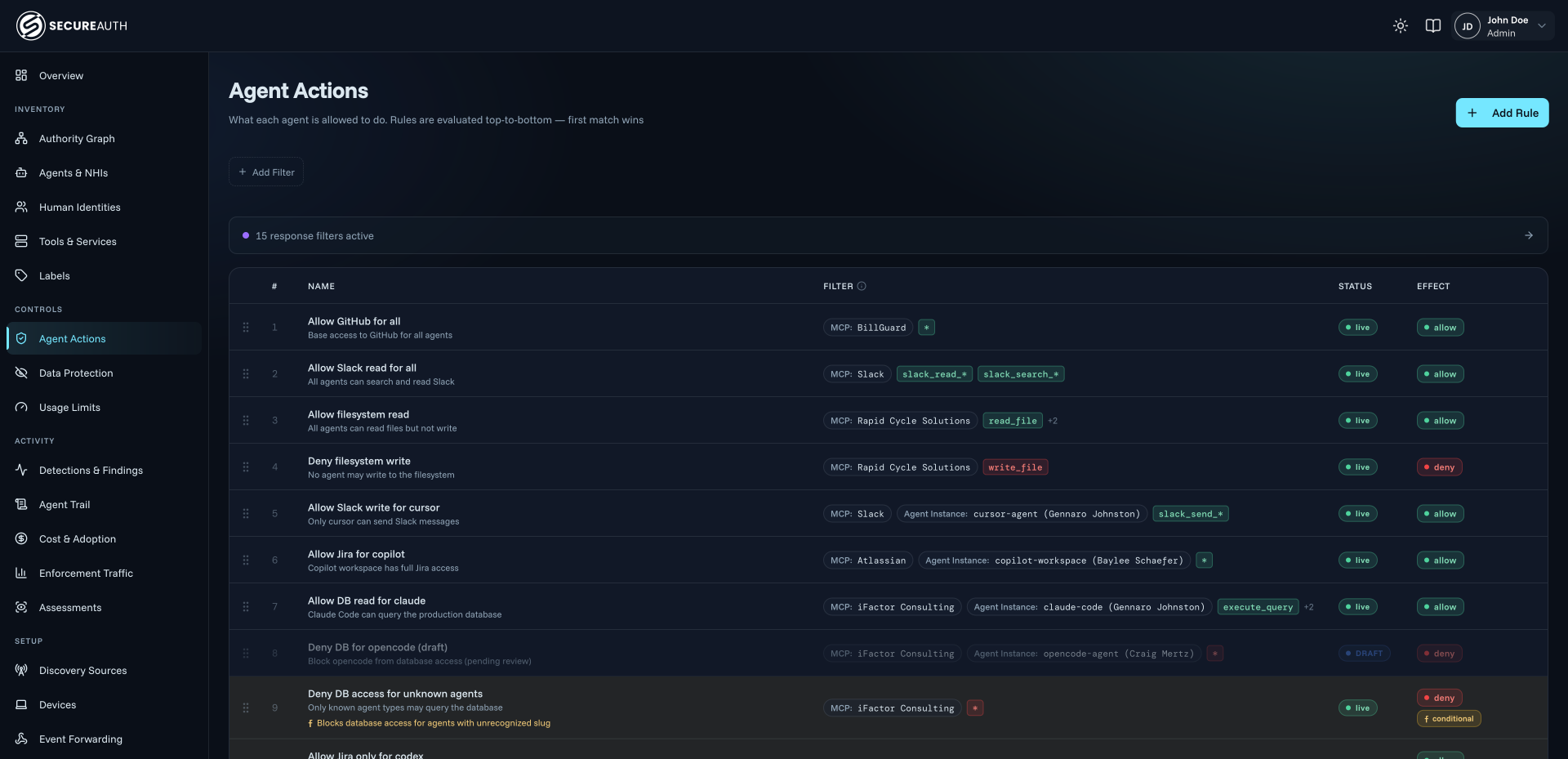
Tool & action authorization, 1 of 4
Detection & risk
Every agent instance is observed against its own baseline, so abnormal behavior from an agent within reach of sensitive data is flagged before it becomes an incident.
Each agent instance is baselined, so drift in what it calls, or how often, shows up as it happens.
Over-privileged, stale or shared credentials behind agents are flagged for review.
See what each agent can reach, and which sensitive data sits inside that reach.
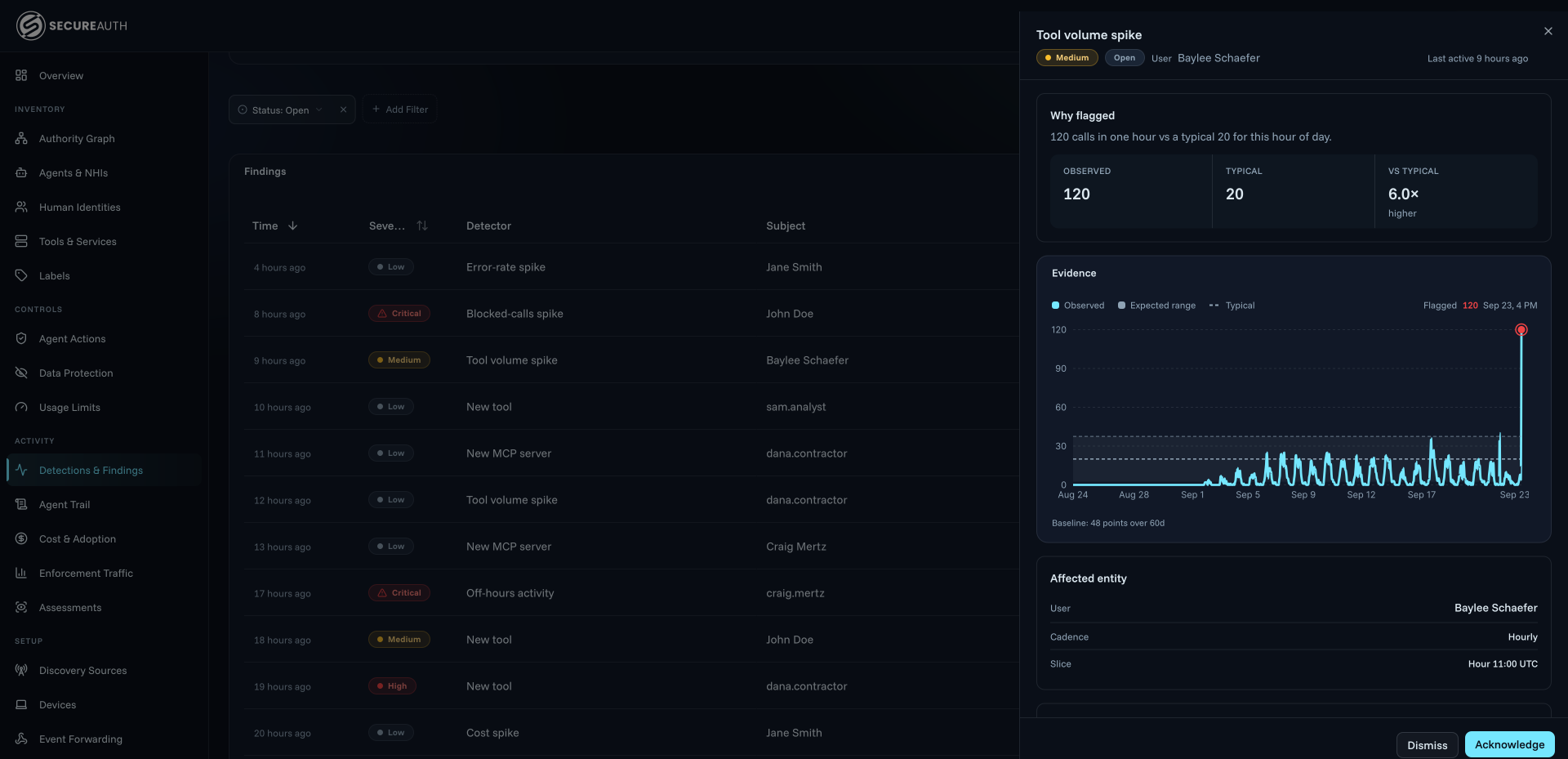
Behavioral anomaly detection, 1 of 3
Prompt & data protection
Authorization decides whether a call happens. Based on the context, responses are masked or blocked in flight, so your data is protected from agents reading it.
Sensitive fields are removed from prompts and responses based on who is asking and why.
Personal, health, financial and regulated data is recognized before it reaches a model.
Instructions hidden in documents, tools or web content are caught before the agent acts on them.
Keys, tokens and passwords are stopped from leaving in prompts or tool calls.
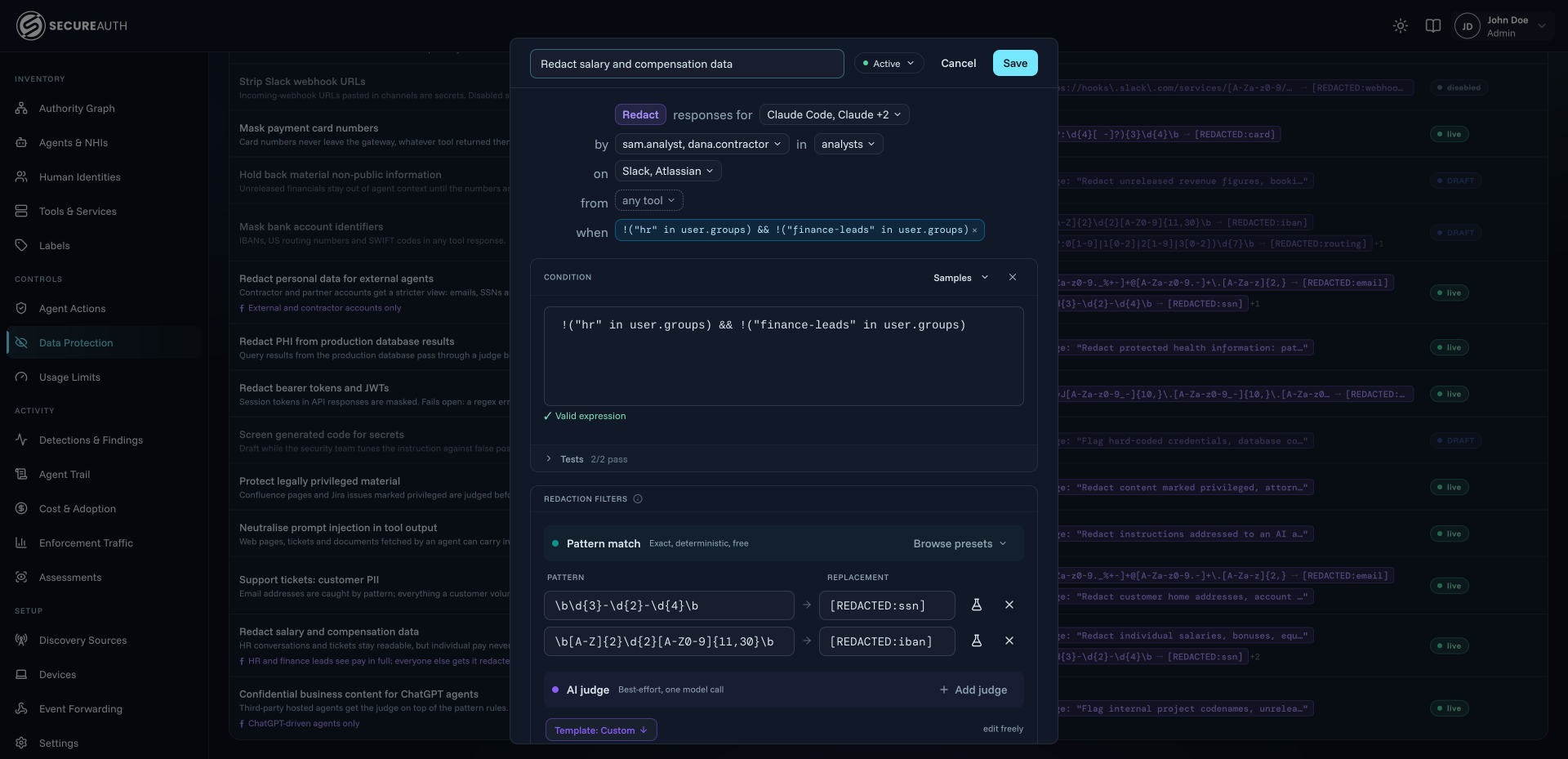
Context-aware redaction, 1 of 4
Cost & operational controls
Spend is attributed to the agents, people and teams driving it, and capped before a loop runs up the bill.
Cap how often an agent can call a tool or model, per instance, team or time window.
Every token and tool call is tied to the agent, person and team behind it.
Budgets that stop a runaway agent before the invoice does.
See which agents are used, by whom, and where AI is delivering.
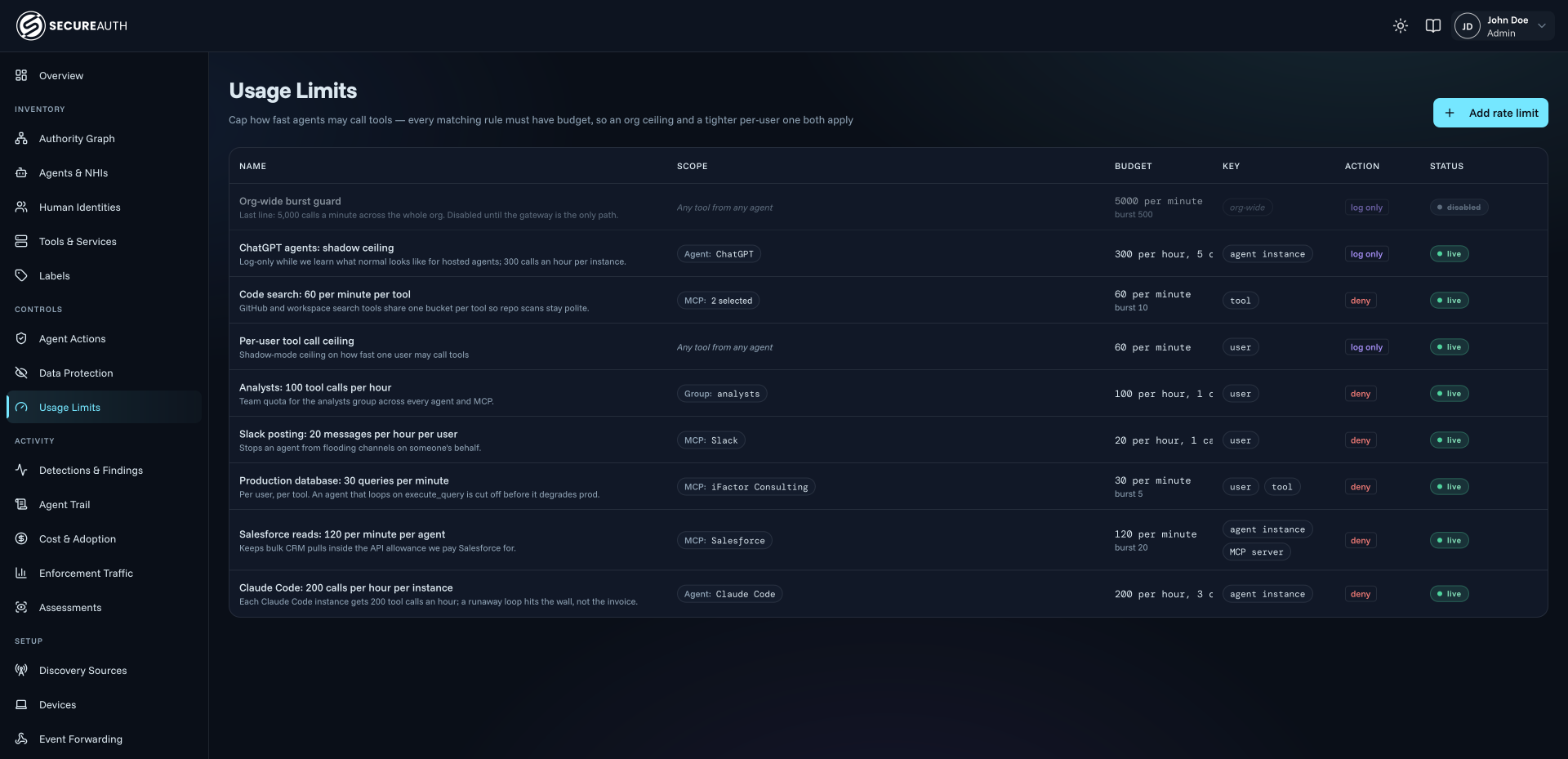
Rate limits & quotas, 1 of 4
Evidence & traceability
Agent Trail records every call an agent made, the delegating user, the context it carried, and the rule that decided it.
Every call an agent made, the person behind it, the arguments it carried and the rule that decided it.
Each allow, deny, hold and redaction is kept with the reason it was made.
Decisions stream into the tools your security team already runs.
See how decisions trend across agents, tools and teams: what is allowed, denied and redacted, and where it is changing.
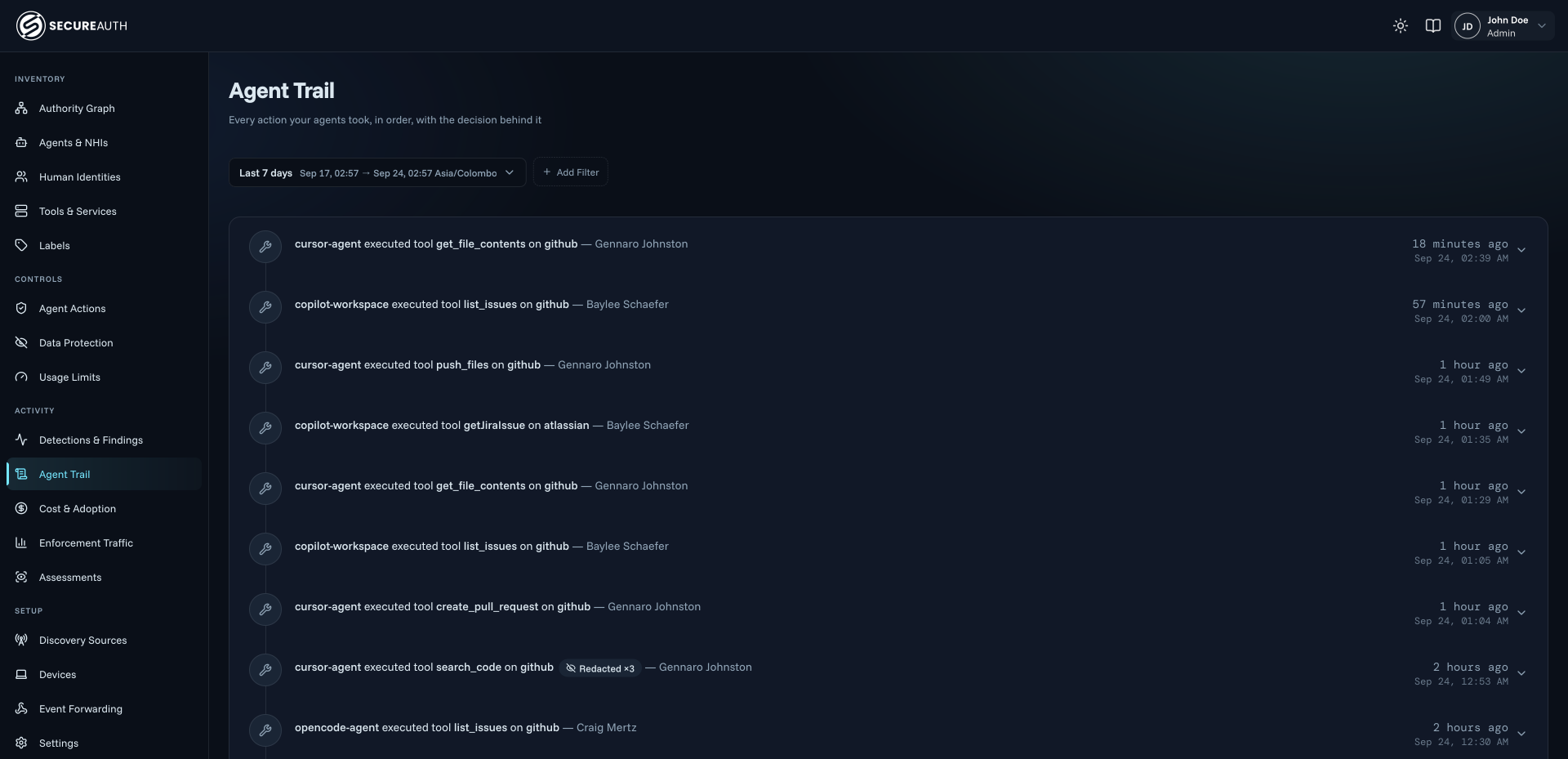
Agent Trail, 1 of 4
Why it’s different
We are not just another MCP gateway
If you only need tool aggregation, an MCP gateway is genuinely useful. If you need to decide what an agent does with those tools, it isn’t enough.
- Granularity
- A typical MCP gateway: Allow or deny per tool, not per operation, argument or field
- Agent AuthorityRe-decides every call on the attributes it carries
- Identity
- A typical MCP gateway: One key per deployment, so every run looks the same
- Agent AuthorityAn identity per run, from the person and the process
- Containment
- A typical MCP gateway: Revoke the key and every agent stops
- Agent AuthorityOne instance suspended and revoked in flight, with every other agent left running
- Response
- A typical MCP gateway: Forwards the response unchanged
- Agent AuthorityFilters the response before the agent reads it
- Spend
- A typical MCP gateway: Caps total spend
- Agent AuthorityMeters the spend and attributes it to the people driving it
- Evidence
- A typical MCP gateway: Forwards the call and moves on
- Agent AuthorityKeeps the record, denied calls included
- Authentication
- A typical MCP gateway: Not its job
- Agent AuthoritySits downstream of your IdP and delegates authentication to it
- Coverage
- A typical MCP gateway: Sees only the agents pointed at it, blind to others
- Agent AuthorityAlso enforced at the model and on the endpoint
| Dimension | A typical MCP gateway | Agent Authority |
|---|---|---|
| Granularity | Allow or deny per tool, not per operation, argument or field | Re-decides every call on the attributes it carries |
| Identity | One key per deployment, so every run looks the same | An identity per run, from the person and the process |
| Containment | Revoke the key and every agent stops | One instance suspended and revoked in flight, with every other agent left running |
| Response | Forwards the response unchanged | Filters the response before the agent reads it |
| Spend | Caps total spend | Meters the spend and attributes it to the people driving it |
| Evidence | Forwards the call and moves on | Keeps the record, denied calls included |
| Authentication | Not its job | Sits downstream of your IdP and delegates authentication to it |
| Coverage | Sees only the agents pointed at it, blind to others | Also enforced at the model and on the endpoint |
Integrations
Integrate seamlessly
Your identity provider stays where it is. Your agents keep their vendors. We sit on the call between them. No code changes, no model lock-in.
Identity Providers
SecureAuth, Okta, Ping, Microsoft Entra ID & more. Keep the one you have
Agent Vendors & Models
Claude, ChatGPT, Gemini, Microsoft Copilot, Cursor, Replit & in-house agents
Enterprise Apps & Data
Salesforce, DocuSign, Slack, Microsoft 365, GitHub, Snowflake & more
SIEM, SOAR & XDR
Splunk, CrowdStrike, Datadog, Microsoft Sentinel & more




'%3e%3cg%20filter='url(%23b)'%3e%3cellipse%20cx='163'%20cy='149'%20fill='%233689FF'%20rx='196'%20ry='159'/%3e%3c/g%3e%3cg%20filter='url(%23c)'%3e%3cellipse%20cx='33.5'%20cy='142.5'%20fill='%23F6C013'%20rx='68.5'%20ry='72.5'/%3e%3c/g%3e%3cg%20filter='url(%23d)'%3e%3cellipse%20cx='19.5'%20cy='148.5'%20fill='%23F6C013'%20rx='68.5'%20ry='72.5'/%3e%3c/g%3e%3cg%20filter='url(%23e)'%3e%3cpath%20fill='%23FA4340'%20d='M194%2010.5C172%2082.5%2065.5%20134.333%2022.5%20135L144-66l50%2076.5Z'/%3e%3c/g%3e%3cg%20filter='url(%23f)'%3e%3cpath%20fill='%23FA4340'%20d='M190.5-12.5C168.5%2059.5%2062%20111.333%2019%20112L140.5-89l50%2076.5Z'/%3e%3c/g%3e%3cg%20filter='url(%23g)'%3e%3cpath%20fill='%2314BB69'%20d='M194.5%20279.5C172.5%20207.5%2066%20155.667%2023%20155l121.5%20201%2050-76.5Z'/%3e%3c/g%3e%3cg%20filter='url(%23h)'%3e%3cpath%20fill='%2314BB69'%20d='M196.5%20320.5C174.5%20248.5%2068%20196.667%2025%20196l121.5%20201%2050-76.5Z'/%3e%3c/g%3e%3c/g%3e%3cdefs%3e%3cfilter%20id='b'%20width='464'%20height='390'%20x='-69'%20y='-46'%20color-interpolation-filters='sRGB'%20filterUnits='userSpaceOnUse'%3e%3cfeFlood%20flood-opacity='0'%20result='BackgroundImageFix'/%3e%3cfeBlend%20in='SourceGraphic'%20in2='BackgroundImageFix'%20result='shape'/%3e%3cfeGaussianBlur%20result='effect1_foregroundBlur_69_17998'%20stdDeviation='18'/%3e%3c/filter%3e%3cfilter%20id='c'%20width='265'%20height='273'%20x='-99'%20y='6'%20color-interpolation-filters='sRGB'%20filterUnits='userSpaceOnUse'%3e%3cfeFlood%20flood-opacity='0'%20result='BackgroundImageFix'/%3e%3cfeBlend%20in='SourceGraphic'%20in2='BackgroundImageFix'%20result='shape'/%3e%3cfeGaussianBlur%20result='effect1_foregroundBlur_69_17998'%20stdDeviation='32'/%3e%3c/filter%3e%3cfilter%20id='d'%20width='265'%20height='273'%20x='-113'%20y='12'%20color-interpolation-filters='sRGB'%20filterUnits='userSpaceOnUse'%3e%3cfeFlood%20flood-opacity='0'%20result='BackgroundImageFix'/%3e%3cfeBlend%20in='SourceGraphic'%20in2='BackgroundImageFix'%20result='shape'/%3e%3cfeGaussianBlur%20result='effect1_foregroundBlur_69_17998'%20stdDeviation='32'/%3e%3c/filter%3e%3cfilter%20id='e'%20width='299.5'%20height='329'%20x='-41.5'%20y='-130'%20color-interpolation-filters='sRGB'%20filterUnits='userSpaceOnUse'%3e%3cfeFlood%20flood-opacity='0'%20result='BackgroundImageFix'/%3e%3cfeBlend%20in='SourceGraphic'%20in2='BackgroundImageFix'%20result='shape'/%3e%3cfeGaussianBlur%20result='effect1_foregroundBlur_69_17998'%20stdDeviation='32'/%3e%3c/filter%3e%3cfilter%20id='f'%20width='299.5'%20height='329'%20x='-45'%20y='-153'%20color-interpolation-filters='sRGB'%20filterUnits='userSpaceOnUse'%3e%3cfeFlood%20flood-opacity='0'%20result='BackgroundImageFix'/%3e%3cfeBlend%20in='SourceGraphic'%20in2='BackgroundImageFix'%20result='shape'/%3e%3cfeGaussianBlur%20result='effect1_foregroundBlur_69_17998'%20stdDeviation='32'/%3e%3c/filter%3e%3cfilter%20id='g'%20width='299.5'%20height='329'%20x='-41'%20y='91'%20color-interpolation-filters='sRGB'%20filterUnits='userSpaceOnUse'%3e%3cfeFlood%20flood-opacity='0'%20result='BackgroundImageFix'/%3e%3cfeBlend%20in='SourceGraphic'%20in2='BackgroundImageFix'%20result='shape'/%3e%3cfeGaussianBlur%20result='effect1_foregroundBlur_69_17998'%20stdDeviation='32'/%3e%3c/filter%3e%3cfilter%20id='h'%20width='299.5'%20height='329'%20x='-39'%20y='132'%20color-interpolation-filters='sRGB'%20filterUnits='userSpaceOnUse'%3e%3cfeFlood%20flood-opacity='0'%20result='BackgroundImageFix'/%3e%3cfeBlend%20in='SourceGraphic'%20in2='BackgroundImageFix'%20result='shape'/%3e%3cfeGaussianBlur%20result='effect1_foregroundBlur_69_17998'%20stdDeviation='32'/%3e%3c/filter%3e%3c/defs%3e%3c/svg%3e)


'%20fill='%23ffff'/%3e%3c/svg%3e)


Connected on secure standards
- OAuth 2.1
- OpenID Connect
- SPIFFE / SVID
- mTLS
- Token exchange
- Model Context Protocol
Get started
Start this week
Try it yourself
Point one agent at it this afternoon.
No agent rewrite, no SDK, no change to how your team works. You change an endpoint, and the first audit trail appears immediately.
// .mcp.json — any MCP-capable agent
{
  "mcpServers": {
    "secureauth": {
      "url": "https://gateway.secureauth.ai/mcp",
      "auth": "oauth"
    }
  }
}

// every tool the agent is entitled to,
// through one brokered endpoint.
// nothing else is reachable.Work with us
Bring us your riskiest agent.
Start with a read-only Agent Risk & Spend Snapshot: what is running, what it can reach, and what it costs. No deck, no instrumentation, no commitment. Just your actual environment.
In your snapshot
What's running
Every agent in your environment, including the unsanctioned ones.
What it can reach
The tools, apps and data each agent can touch.
What it costs
Spend by the agents, people and teams driving it.
Read-only · No SDK · No agent changes